Merlin’s weekly podcast with Dan Benjamin. We talk about creativity, independence, and making things you love.
Quicksilver: AppleScript to quickly add Entourage Tasks
Merlin Mann | Jun 14 2005
A hacker who wishes to remain anonymous has answered my prayers by creating a modest one-line AppleScript that lets you pipe input from Quicksilver into a new Entourage Task with zero cruft—no Category, no Project, no date, and no reminder. Perfect for fast capture any place, and something I’ve craved for over a year. To install:
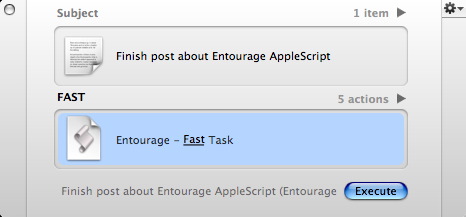
To use (just one example):
Jump over to Entourage and you should have a nice new task sitting in your list. Note that the Quicksilver input, as ever, can come from practically anyplace; you can select text in Safari and “Send to Quicksilver” ( Like I say, if you want all the “trimmings,” you should enter Tasks in Entourage as usual, but this is just terrific for capturing stuff quickly without changing modes. A minor godsend as far as I’m concerned. (As ever with all my Quicksilver tips, I’m sure I’ve forgotten some critical element that makes this work on your end; if the Setup guide doesn’t answer your question, post a comment) 23 Comments
POSTED IN:
 Here’s a question for you...Submitted by Merlin on June 14, 2005 - 9:31am.
Here’s a question for you AppleScript folks. If I wanted to pass the text to Entourage with a certian category attached to it (so I could, in this example, emulate an inbox), it seems like this should work for line 3…
…but I’m getting no luck. What would that line need to be to work correctly? Would be cool, because then you could have a custom view that shows just “inbox” tasks—effectively creating a box of tasks that need to be processed regularly. TIA » POSTED IN:
|
|

| EXPLORE 43Folders | THE GOOD STUFF |


