Drowning in email? Try Inbox Zero to learn sane tips for dealing with high-volume email. And don’t miss the free Inbox Zero video. »
Register for free on 43 Folders to comment on articles, post to our forum, customize your visits, and much more. Current users can login now.
Quicksilver: AppleScript to quickly add Entourage Tasks
Merlin Mann | Jun 14 2005
A hacker who wishes to remain anonymous has answered my prayers by creating a modest one-line AppleScript that lets you pipe input from Quicksilver into a new Entourage Task with zero cruft—no Category, no Project, no date, and no reminder. Perfect for fast capture any place, and something I’ve craved for over a year. To install:
To use (just one example):
Jump over to Entourage and you should have a nice new task sitting in your list. Note that the Quicksilver input, as ever, can come from practically anyplace; you can select text in Safari and “Send to Quicksilver” ( Like I say, if you want all the “trimmings,” you should enter Tasks in Entourage as usual, but this is just terrific for capturing stuff quickly without changing modes. A minor godsend as far as I’m concerned. (As ever with all my Quicksilver tips, I’m sure I’ve forgotten some critical element that makes this work on your end; if the Setup guide doesn’t answer your question, post a comment) 23 Comments
POSTED IN:
![]() [...] I stumbled across an...Submitted by Kucic.com » Blog Archive » Great Tool for the Ma (not verified) on October 16, 2006 - 6:48am.
[…] I stumbled across an application called quicksilver today while looking for some way to get tasks from entourage into an excel spreadsheet. This application takes organization and task simplification to a whole new level. Here is an introducation to Quicksilver via Macbreak. Guess Macbreak is now another feed I need to track in iTunes. Here is a link about integrating Applescript into Quicksilver. Also ran across a website called codefetch. This site will warrent further checking when I have coding needs! […] » POSTED IN:
Here’s a question for you...Submitted by Merlin Mann on June 14, 2005 - 8:31am.
Here’s a question for you AppleScript folks. If I wanted to pass the text to Entourage with a certian category attached to it (so I could, in this example, emulate an inbox), it seems like this should work for line 3…
…but I’m getting no luck. What would that line need to be to work correctly? Would be cool, because then you could have a custom view that shows just “inbox” tasks—effectively creating a box of tasks that need to be processed regularly. TIA » POSTED IN:
![]() There has GOT to be...Submitted by marm0t (not verified) on June 14, 2005 - 8:54am.
There has GOT to be a band called Zero Cruft. » POSTED IN:
"Hello, Cleveland!"...Submitted by Merlin Mann on June 14, 2005 - 9:02am.
“Hello, Cleveland!” » POSTED IN:
![]() It didn't work until I...Submitted by Steve Nelson (not verified) on June 14, 2005 - 9:27am.
It didn’t work until I moved the script into ~/Library/Application Support/Quicksilver/Actions/ (per the Quicksilver docs at http://quicksilver.blacktree.com/docs/?page=Scripts ) instead of: ~/Library/Application Support/Quicksilver/Actions/ (per your instructions above) » POSTED IN:
Thanks, Steve. Fixed in the...Submitted by Merlin Mann on June 14, 2005 - 9:34am.
Thanks, Steve. Fixed in the post. » POSTED IN:
![]() Holy Crap! so *THATS* how you...Submitted by Ryan Nelson (not verified) on June 14, 2005 - 11:48am.
Holy Crap! so THATS how you create your own actions in QS! I swear, i’ve been looking for that howto forever. (really, the QS documentation is it’s biggest weakness. I realize, though, that it’s god-like powers probably defy description, though.) armed with this tidbit as a start, I can now hook directly to the Backpack API: install this script, as described in the parent post, into ~/Library/Application Support/Quicksilver/Actions/ : (i’ve linked to the txt, ‘cause commenting messes up the formatting) http://www.ryan.net/misc/backpack/applescript.txt …and install this shell script in someplace of your choice (and make sure the applescript has the proper path) (again, i’ve linked to the txt, ‘cause commenting messes up the formatting) http://www.ryan.net/misc/backpack/shellscript.txt …and blam! …i can type into quicksilver and put to-do items on my list, using the API, and not the roundabout “mail it onto backpack” quicksilver methods posted various places already. woo! » POSTED IN:
Note: you can also assign...Submitted by Merlin Mann on June 14, 2005 - 2:00pm.
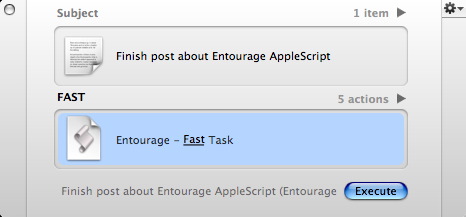
Note: you can also assign a key trigger to add this functionality with even less clicking. Here’s what the resulting panes look like: http://pix.merlinmann.com/FastTaskTriggered.jpg » POSTED IN:
![]() Can a script like this...Submitted by PaulT (not verified) on June 14, 2005 - 11:44pm.
Can a script like this be created to post to iCal to-do’s as well? Would that be difficult? » POSTED IN:
![]() To assign a category in...Submitted by Joe Hildebrand (not verified) on June 15, 2005 - 5:29am.
To assign a category in Entourage, try this (make sure the inbox category is created first): using terms from application “Quicksilver” on process text t tell application “Microsoft Entourage” set cat to item 1 of (every category whose name is “inbox”) make new task with properties {name:t, category:cat} end tell end process text end using terms from » POSTED IN:
![]() For iCal, try this: using terms...Submitted by Joe Hildebrand (not verified) on June 15, 2005 - 5:34am.
For iCal, try this: using terms from application “Quicksilver” on process text t tell application “iCal” set cal to (item 1 of (every calendar whose writable is true)) make new todo at end of todos of cal with properties {summary:t} end tell end process text end using terms from » POSTED IN:
![]() This iCal script posted by...Submitted by Jeff P. (not verified) on June 15, 2005 - 7:35am.
This iCal script posted by Joe works great for adding to-do’s to iCal. One question though—I hate that it opens iCal if it’s not already open. Any way to avoid this? Applescript Clueless — Jeff » POSTED IN:
![]() I don't seem to have...Submitted by Craig Canapari (not verified) on June 15, 2005 - 8:57am.
I don’t seem to have an “Actions” folder— only a text file. How to proceed? » POSTED IN:
![]() I didn't have an Actions...Submitted by Jeff P. (not verified) on June 15, 2005 - 12:14pm.
I didn’t have an Actions folder previously either; just create one with that name and put the script file in it. This won’t interfere with the already installed actions, don’t worry. » POSTED IN:
![]() Jeff P.: No. There's...Submitted by Joe Hildebrand (not verified) on June 15, 2005 - 12:21pm.
Jeff P.: No. There’s no way to not launch iCal. You could make the script check to see if iCal is running when it starts, and if it isn’t, close iCal when it’s done. Merlin: how did you get that trigger to prompt you for text? » POSTED IN:
![]() Merlin, I might be completely...Submitted by itchy (not verified) on June 16, 2005 - 3:01am.
Merlin, I might be completely off on this one, but the linked applescript seems to be blank (showing up as 0 bytes in finder, blank in Script Editor and BBedit. Any thoughts? thanks and keep up the good work. » POSTED IN:
![]() Springboarding off a springboard, this...Submitted by Scott Palmer (not verified) on June 16, 2005 - 3:18am.
Springboarding off a springboard, this script automatically sets a due date and a reminder of one day from now for your task in iCal. This helps me keep track, and won’t let me toss it in and forget it. I have 2 scripts, one that sets the reminder and one that doesn’t. using terms from application “Quicksilver” on process text t tell application “iCal” set cal to (item 1 of (every calendar whose writable is true)) set newTodo to make new todo at the end of todos of cal tell newTodo set summary to t set due date to current date set myReminder to make new display alarm at the end of display alarms of newTodo tell myReminder set trigger date to ((current date) + 86400) end tell end tell end tell end process text end using terms from » POSTED IN:
Sorry about that, Itchy. Works...Submitted by Merlin Mann on June 16, 2005 - 3:19am.
Sorry about that, Itchy. Works ok from here. Here’s the guts, if you want to DIY. :) using terms from application “Quicksilver” on process text t tell application “Microsoft Entourage” to make new task with properties {name:t} end process text end using terms from » POSTED IN:
![]() Works great now. thanks for...Submitted by itchy (not verified) on June 16, 2005 - 3:32am.
Works great now. thanks for the quick response and the great script. » POSTED IN:
![]() Using the original as a...Submitted by G (not verified) on June 21, 2005 - 6:09am.
Using the original as a starting point here is a slightly more complicated version that adds a “choose from” dialog for categories (use arrow keys and return/enter for keyboard control) and support for LaunchBar. Just cut and paste into Script Editor and save as a script: (* Note: This was written and tested on Tiger with Entourage 2004, LaunchBar 4, and Quicksilver beta 42. *) —If invoked from Quicksilver using terms from application “Quicksilver” on process text theName my main(theName) end process text end using terms from —If invoked from LaunchBar on handlestring(theName) my main(theName) end handlestring —The main functionality of this script on main(theName) —First we need the name of the front app before QS or LB were summoned tell application “System Events” set frontApp to (name of (processes whose frontmost is true)) as text end tell —get the categories from Entourage tell application “Microsoft Entourage” set catList to the name of every category end tell —choose the category from the current app tell application frontApp set selectedCategory to (choose from list catList with title “Select Category”) as string end tell —create the note tell application “Microsoft Entourage” set chosenCategory to category selectedCategory set newNote to make new task with properties {name:theName, category:chosenCategory} end tell end main » POSTED IN:
![]() Anyone have a link to...Submitted by Jon Swartz (not verified) on August 10, 2005 - 3:27am.
Anyone have a link to a reference guide for Entourage Applescript? It looks like Microsoft used to make one available - see http://www.webmastermac.com/article.php/20040117014023822, “Microsoft Entourage AppleScript Reference” - but the link no longer works and I can’t find the guide anywhere. Or are people just guessing field names, and copying/pasting from other scripts, when they write scripts against Entourage? :) My particular problem right now is that I can’t seem to populate the “notes” field for a task from an entourage script. I tried the obvious {name:theName,notes:theNotes} but notes ends up blank. TIA for any help you can provide! » POSTED IN:
![]() The property you are looking...Submitted by G (not verified) on September 23, 2005 - 4:11pm.
The property you are looking for is called content. Example: content:someString As for the ref docs use the Entourage’s AppleScript dictionary, from Script Editor: File -> Open Dictionary » POSTED IN:
![]() [...] The marquee feature for...Submitted by KGTD keeps getting better | 43 Folders (not verified) on February 27, 2006 - 7:01am.
[…] The marquee feature for us Quicksilver flying monkeys is the addition of an Applescript for adding to a KGTD inbox from anywhere. I swear by these sorts of scripts (and currently use about 7 of them to generate Category-based Tasks in Entourage). Note that in the image above, you’re seeing where I’ve created a Quicksilver trigger (F8) for the script plus its action via “KGTD Inbox > Process Text…” For what it’s worth, this is a bit like putting your steroids on steroids. […] » POSTED IN:
About Merlin MannBio Merlin Mann is an independent writer, speaker, and broadcaster. He’s best known for being the guy who started the website you’re reading right now. He lives in San Francisco, does lots of public speaking, and helps make cool things like You Look Nice Today. Also? He looks like this, answers questions, and has something like a life. |
|
| EXPLORE 43Folders | THE GOOD STUFF |