Merlin’s weekly podcast with Dan Benjamin. We talk about creativity, independence, and making things you love.
Quicksilver: AppleScript to quickly add Entourage Tasks
Merlin Mann | Jun 14 2005
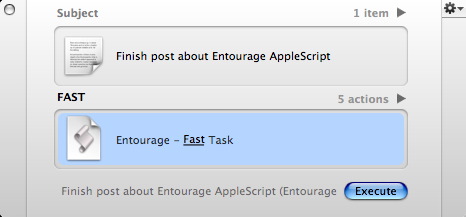
A hacker who wishes to remain anonymous has answered my prayers by creating a modest one-line AppleScript that lets you pipe input from Quicksilver into a new Entourage Task with zero cruft—no Category, no Project, no date, and no reminder. Perfect for fast capture any place, and something I’ve craved for over a year. To install:
To use (just one example):
Jump over to Entourage and you should have a nice new task sitting in your list. Note that the Quicksilver input, as ever, can come from practically anyplace; you can select text in Safari and “Send to Quicksilver” ( Like I say, if you want all the “trimmings,” you should enter Tasks in Entourage as usual, but this is just terrific for capturing stuff quickly without changing modes. A minor godsend as far as I’m concerned. (As ever with all my Quicksilver tips, I’m sure I’ve forgotten some critical element that makes this work on your end; if the Setup guide doesn’t answer your question, post a comment) 23 Comments
POSTED IN:
 To assign a category in...Submitted by Joe Hildebrand (not verified) on June 15, 2005 - 6:29am.
To assign a category in Entourage, try this (make sure the inbox category is created first): using terms from application "Quicksilver" on process text t tell application "Microsoft Entourage" set cat to item 1 of (every category whose name is "inbox") make new task with properties {name:t, category:cat} end tell end process text end using terms from » POSTED IN:
|
|

| EXPLORE 43Folders | THE GOOD STUFF |


