Merlin’s weekly podcast with Dan Benjamin. We talk about creativity, independence, and making things you love.
Sending short email messages from within Quicksilver
Merlin Mann | Aug 10 2005
I’ve recently gotten in the habit of using the email subject line alone to convey a short message. The old-school best practice of geeks in this matter is to end a self-sufficient subject with
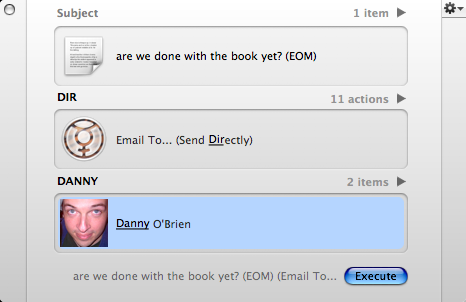
Neat trick here for Quicksilver users to dash off an EOM-type email from right inside the app. (Yes, I assume this requires the Mail and Address Book plugins, possibly others, yadda yadda yadda).
If everything is configured right, this should send an email with the contents of step 3 as both the subject and the body of the message. Of course, this would also work really well with Andrew’s Gmail To-do and Journal system among many other things, but I love it especially as way to quickly dash off a super-efficient email without changing modes. And most recipients love the brevity, so everybody wins. 13 Comments
POSTED IN:
 Hmm, it was only the...Submitted by scruss (not verified) on August 10, 2005 - 8:08am.
Hmm, it was only the Windows-using suits and marketroids that used EOM or n/m in a subject line in my old unixish place of work. The rest of us sent subject-only e-mails using mailx from the shell. 'gone to the canteen' needs no further explanation. » POSTED IN:
|
|

| EXPLORE 43Folders | THE GOOD STUFF |


