Merlin’s weekly podcast with Dan Benjamin. We talk about creativity, independence, and making things you love.
Sending short email messages from within Quicksilver
Merlin Mann | Aug 10 2005
I’ve recently gotten in the habit of using the email subject line alone to convey a short message. The old-school best practice of geeks in this matter is to end a self-sufficient subject with
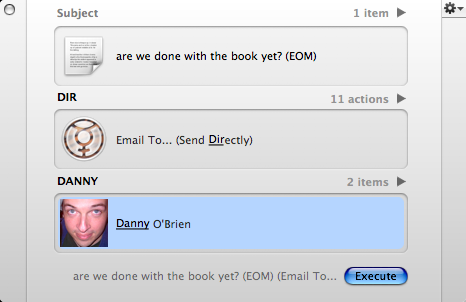
Neat trick here for Quicksilver users to dash off an EOM-type email from right inside the app. (Yes, I assume this requires the Mail and Address Book plugins, possibly others, yadda yadda yadda).
If everything is configured right, this should send an email with the contents of step 3 as both the subject and the body of the message. Of course, this would also work really well with Andrew’s Gmail To-do and Journal system among many other things, but I love it especially as way to quickly dash off a super-efficient email without changing modes. And most recipients love the brevity, so everybody wins. 13 Comments
POSTED IN:
 Good one, Dan. I try leave...Submitted by Merlin on August 10, 2005 - 8:56am.
Good one, Dan. I try leave my #1 as "Paste" and #2 as "Append to..." but that's a great suggestion. There's a lot of power in that Actions area. Do you notice that yrs get re-jiggered when you add new Services, and Plugins? Seems like new ones always gobble the top slot wherever they apply. » POSTED IN:
|
|

| EXPLORE 43Folders | THE GOOD STUFF |


