Merlin’s weekly podcast with Dan Benjamin. We talk about creativity, independence, and making things you love.
TextExpander: Essential Mac shortcut utility
Merlin Mann | Sep 5 2006
TextExpander just got an update that adds a few features and fixes to this already essential OS X PreferencePane. Via email:
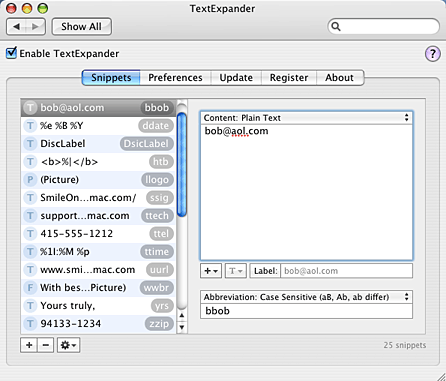
I have to say, I just love TextExpander (formerly “Texpander”). Its functionality is not unique — users of, say, TextMate, TypeIt4Me, or Windows’ popular ActiveWords (Hi, Buzz), or for that matter, Vim, will recognize the similarities. But, brother, is it ever easy to setup, modify, and use. At the heart of it, TE gives you system-wide text shortcuts that, when typed, explode into much longer bits of text or can even, say, paste in an image, like your scanned signature. So, for example, if you’re sick of retyping a new email sig, you can store it in TE and assign “ A screenshot of the control panel, courtesy of the Smile on My Mac site:
There’s just too many uses for TextExpander to try and catalog here, but I'll share a few that I particularly like...
Then there are just all those little bits of code and functionality that it sucks to type manually all the time — especially if you live and type in a web browser all day. I use this for things like HTML tags and date-stamp formats, the latter of which make it super-simple to label versions of new documents and do fast ad hoc backups. Here’s the actual code for a few of my favorites.
Like I say the uses are endless, and with recent versions, things get even sexier; you can make the snippets CaSe-dependent, and, although I haven’t played with it yet, you can now choose delimiters so you aren't accidentally stepping on "real words" or, for example, other abbreviations in your text editor or IDE. TextExpander 1.4 requires Mac OS X 10.4, costs $29.95, and is available for download as a 30-day, full-feature demo. Try it and see what you think. It’s saved me way more than $30 worth of idiotic typing time. 3 Comments
POSTED IN:
 [...] Merlin Mann at 43...Submitted by Hawk Wings » Blog Archive » TextExpander: Update (not verified) on September 6, 2006 - 1:46am.
[...] Merlin Mann at 43 Folders uses this update as an opportunity to share some tips on the ways in which he uses the app to save time and fingers. [...] » POSTED IN:
|
|

| EXPLORE 43Folders | THE GOOD STUFF |


