Merlin’s weekly podcast with Dan Benjamin. We talk about creativity, independence, and making things you love.
TextExpanderNew TextExpander snippets for fast HTMLMerlin Mann | Apr 10 2007TextExpander: Customizable Typing Utility Saves Time! (TextExpander snippets)
TextExpander nerds, rejoice! Your friends at Smile on My Mac have added a couple new snippet sets that can be imported into our favorite keystroke-saving preference pane. read more »POSTED IN:
Text Expander for automagic typo correctionMerlin Mann | Oct 23 2006TextExpander AutoCorrect Snippet File Recently, I was emailing with our friends over at Smile on My Mac about how I use Text Expander as an automatic spelling and typo corrector, and I realized that there wasn't a canonical location for the user-created "snippets" file you need to import in order to get this feature working. read more »4 Comments
POSTED IN:
TextExpander: Essential Mac shortcut utilityMerlin Mann | Sep 5 2006TextExpander just got an update that adds a few features and fixes to this already essential OS X PreferencePane. Via email:
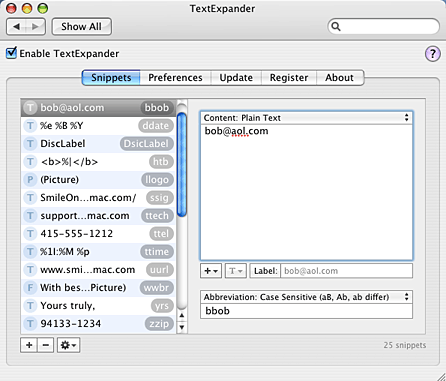
I have to say, I just love TextExpander (formerly “Texpander”). Its functionality is not unique — users of, say, TextMate, TypeIt4Me, or Windows’ popular ActiveWords (Hi, Buzz), or for that matter, Vim, will recognize the similarities. But, brother, is it ever easy to setup, modify, and use. At the heart of it, TE gives you system-wide text shortcuts that, when typed, explode into much longer bits of text or can even, say, paste in an image, like your scanned signature. So, for example, if you’re sick of retyping a new email sig, you can store it in TE and assign “ A screenshot of the control panel, courtesy of the Smile on My Mac site:
There’s just too many uses for TextExpander to try and catalog here, but I'll share a few that I particularly like... read more »POSTED IN:
Textpander: An end at last to email from 'Melrin'Merlin Mann | Sep 17 2005Peter Maurer [Textpander] It took me about 5 seconds to fall hopelessly in love with Textpander. Like so many wonderful things in the world (*waves to Unix apps*) it does exactly one thing: it replaces text you type with other text (or images). So, how would you use this? God, how wouldn’t you? Here’s the bullets from the Textpander page: read more »POSTED IN:
|
|


| EXPLORE 43Folders | THE GOOD STUFF |


