Merlin’s weekly podcast with Dan Benjamin. We talk about creativity, independence, and making things you love.
"Music Only" for your iTunes playlists
Merlin Mann | Nov 9 2006
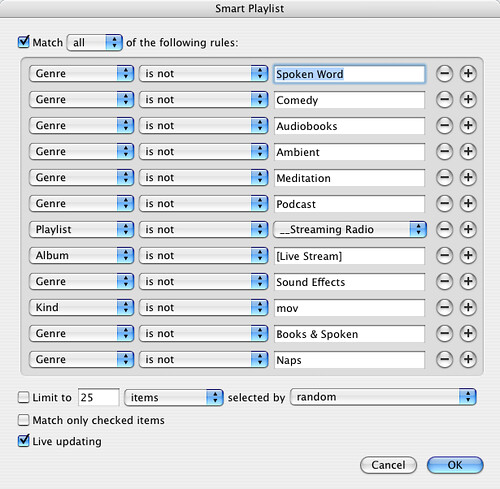
New for Friday 11/10: In my MacBreak Weekly capacity as Vice-President in Charge of Digging Pointless Ratholes™, I recently mentioned some tricks that I use to create better playlists in iTunes. One of these tricks -- which is an oldie, and which I'm certain I yoinked from some uncredited smarter person out in the blogtropolis -- is to create a "Music Only" list. So you know how you have increasing buttloads of non-music (podcasts, audio books, etc.) in your iTunes library? It's really annoying to throw on one of your sexy Smart Playlists or the Party Shuffle, only to have a 20 minute nap or a Noam Chomsky lecture kick in. I get around this by basing almost all my Smart Playlists on my one canonical "Music Only" list, which currently looks like this:
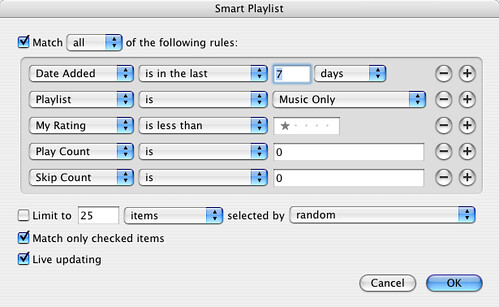
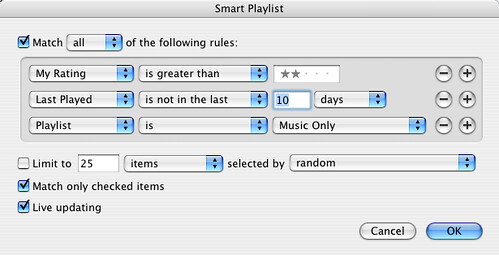
Yes, it's very hacky, and yes there's probably a more elegant way to accomplish this effect, but so far it's been a handy jumping off point for my favorite Smart Playlists. This helps me build stuff like... New and unlistened-to
My neglected lovers
If you're even a casual iTunes user, it pays to spend some time rating your songs (no they can't all be "5 stars"), adding rich metadata, and building Smart Playlists. So powerful. And it you're using a (GUI-free) iPod Shuffle but not Smart Playlists? Man, that's just nuts.  Revenge of the Smart Playlist: 5 tricks for packrats & power users Revenge of the Smart Playlist: 5 tricks for packrats & power users
By popular demand, here are five more Smart Playlists, designed to help you manage very large libraries and bubble up interesting tracks (that you may not realize you like). (more ») 50 Comments
POSTED IN:
 Using quicksilver triggers with the...Submitted by Brian Stakes (not verified) on November 9, 2006 - 11:01am.
Using quicksilver triggers with the same prefix keys (ctrl+alt+apple) and 1-5 on the keypad have really helped my song rating tendencies. I never have to look at iTunes and I can still rate songs. » POSTED IN:
|
|

| EXPLORE 43Folders | THE GOOD STUFF |


