43 Folders

43 Folders feed subscription icon - Shiny! Drowning in email? Try Inbox Zero to learn sane tips for dealing with high-volume email. And don’t miss the free Inbox Zero video. »

Login or register

Register for free on 43 Folders to comment on articles, post to our forum, customize your visits, and much more. Current users can login now.

TextExpander 2: .Mac syncing and much more

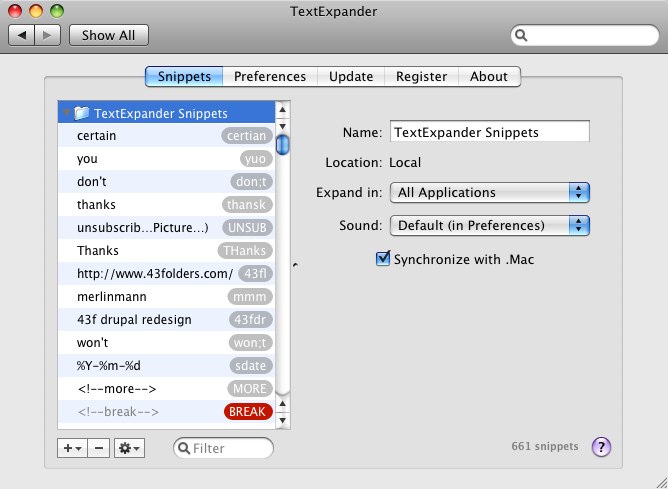
One of my favorite things on my Mac is TextExpander, a PreferencePane that’s come up here before and which lets you use text shortcuts for pasting larger blocks of text and graphics wherever your cursor is without batting an eye. Well, SmileOnMyMac has recently released a 2.0 of TE, that adds several useful features, including one that really got my attention:

  • Snippet groups
  • Add snippet groups from external files
  • Add snippet groups from URLs (including password-protected URLs with Keychain support)
  • Synchronize snippet groups using .Mac synchronization
  • Print snippets
  • Hotkeys to enable / disable and to create snippets from selection or clipboard
  • Enable or disable groups on a per-application basis
  • Sort snippets by date last used to identify unused snippets for possible deletion
  • AppleScript snippets, which expand to the result of the script
  • More options for sounds
  • Sound settings on a per-group basis
  • Update snippet groups from URLs and external files at regular intervals
  • Improved performance with large numbers of snippets
  • User interface improvements
  • Additional improvements too numerous to mention

Mmmm…”Synchronize snippet groups using .Mac synchronization.” I like the sound of that one quite a lot.

In fact, I wonder if one way to get me whining less about syncing would be for more apps to include built-in .Mac sync. TextExpander had been high on the list of contenders for adding syncing; believe me, you don’t want to try and keep 661 abbreviations synced up with spit and bailing wire.

Also, for folks who have a large library, the addition of “most recently used” sorting is swell. Also loving the idea of keychain support (although I haven’t tried that one yet).

If you’re the sort of person who’s struggling to get faster on your Mac, definitely start with TextExpander. You can shave minutes off every hour with this guy. I probably save an hour a day just not having to fix “thnaks” and “Melrin.”


Bonus: Here’s a MacBreak that Leo and I did on TextExpander:


14 Comments

Comment viewing options

Select your preferred way to display the comments and click "Save settings" to activate your changes.
ywickam's picture

I seriously don’t know how

I seriously don’t know how I got by without this. It’s great! Just wish I had it last week when I had an influx of orders and had to keep typing the same thing over and over and over…well, you get the picture. :)

jbessey's picture

What do you use TE for?

Anybody want to post some of their most common uses of this app? I’m doing the basic stuff such as name, address, e-mails, letter closings, etc. but I’m looking for innovative uses that other people have come up with.

duus's picture

Re: What do you use TE for?

Merlin did a post once, which I can’t find, but he suggested things like:

\card for your credit card number (not secure, but, uh, okay, well, it’s not secure.)

eirkeirkeirk's picture

Did it work in Flash before?

I’m pretty sure that TextExpander 1.4.2 didn’t work properly in Flash. I had tried to use snippets for some of my commonly used lines of ActionScript, but when TE inserted the replacement text it didn’t actually REPLACE the text - it just added it after the text that triggered the replacement in the first place! My point being: it now works fine in Flash CS3.

P.S. TE just fixed the typo I made while typing “that” just a second ago :)

adamqp's picture

Whatever happened to Macbreak Video?

I’m looking forward to using this too, especially the .Mac syncing. .Mac syncing makes my life bearable right now and it looks like Leopard’s going to enhance it even further. I use it for making standard comments on document revisions (“This needs to be clearer.”, “Perhaps you could expand on this point.”, etc.) The only thing that could make it better for me at this point is if it had some of the complex tabbing infrastructure you get with the tab key in Textmate. I’ve always wondered if that was possible OS-wide with OS X, perhaps using the way the option key allows you to insert accents on different letters.

But Merlin, whatever happened to those quick Macbreak video clips? They were really useful and I learned about a ton of new, helpful programs from them.

cephalopodcast's picture

Mini Merl

Reckon it’s ‘cause Merlin is being more reproductive than productive these days, no? Mentioned something about scaling back on MacBreak Weekly.

Merlin Mann's picture

I'm just "the talent."

I’m just “the talent.”

Alex tells me to show up someplace (wearing pants) at a given time, and I start talking about macs while a camera runs.

He’s the man to ask about new eps. (Although he has “reproduction” activity. of his own right now)

cephalopodcast's picture

It takes talent

Although he has “reproduction” activity. of his own right now

Well, if you two would keep your pants on, this wouldn’t happen.

cephalopodcast's picture

TE Barfs a lot

Anyone else have a problem with Textexpander barfing? Sometimes I have to retype the snippet a couple times to get it to pop (which defeats the purpose of the program in the first place). If I change focus to another program and then go back it sometimes works again.

We’ll see if the update makes a difference.

communicatrix's picture

Uses besides teh obvious

Merlin & Leo covered a ton of stuff in the video. Personally, I find it mostly useful for:

  • my ever-growing raft of email sigs

  • my hopefully-not-growing list of email addys (why do I always pick loooong names?)

  • flickr credit info on blog

  • unwieldy yet oft-used URLs: public iDisk, my photo sig on a group blog I manage (I have one set up for all users—snap!)

  • boilerplate: LinkedIn refusals, intro text on a blog series, thank you text on Flickr pp whose pix I use, etc.

This new ability to exclude apps rocks in a major way. I’d been putting off the new install—thanks for the push, Merlin.

communicatrix's picture

and don't forget the small things...

My sig has been “xxx (return) c” since I was doing it on lined paper in 1968.

Creating a TextExpander snippet that removes the third “x” and the return makes the process so much easier and more pleasant, and given the amount of correspondence I have, will probably add 1.5 years to my life.

Ditto my tel #, the word “with” (now w/), and a bunch of MailTags like “receipts”, “taxes2007”, “registrations”, etc.

It’s kind of the McDonald’s theory of efficiency—a second here, a nanosecond there…

kongjie's picture

Comparison would be nice

I wonder how the latest version of TextExpander holds up against the other competitors in the market.

Right now, because I’m cheap, I use the old, free version of Textpander. They dropped the “e” for “saveings.”

It is invaluable, partly because the academic program I coordinate has a title that is 63 letters long. There are also a number of words related to our work that are not easily spelled and a little long that I type again and again and again.

However, Textpander does sometimes not respond as someone else noted above and the abbreviation has to be retyped. A bigger problem is that if you err while typing the abbreviation and fix it, it doesn’t work. You have to retype the abbreviation from the beginning for Textpander to recognize it. I wonder if this has changed in TextExpander.

Govan's picture

Personally, I *heart* the Applescript support.

It's the killer feature of TextExpander for me. I use it to build some of the more common snippets from other Apps like Mail or Address Book. If I can get away with a shameless plug.

ronkfel's picture

OK I'm an Idiot

I am loving this app but have not figured out the steps to synch with .mac. Nothing on the application’s Wiki help pages that explains.

 
EXPLORE 43Folders THE GOOD STUFF

An Oblique Strategy:
Discard an axiom


STAY IN THE LOOP:

Subscribe with Google Reader

Subscribe on Netvibes

Add to Technorati Favorites

Subscribe on Pageflakes

Add RSS feed

The Podcast Feed

Inbox Zero

The original 43 Folders series looking at the skills, tools, and attitude needed to empty your email inbox — and then keep it that way. Don’t miss the free video of Merlin’s Inbox Zero presentation.

Get Started with ‘GTD’

David Allen’s popular productivity book and the system on which it’s based help turn ‘stuff’ into actions that support valuable outcomes.