Merlin’s weekly podcast with Dan Benjamin. We talk about creativity, independence, and making things you love.
TextExpander 2: .Mac syncing and much more
Merlin Mann | Oct 17 2007
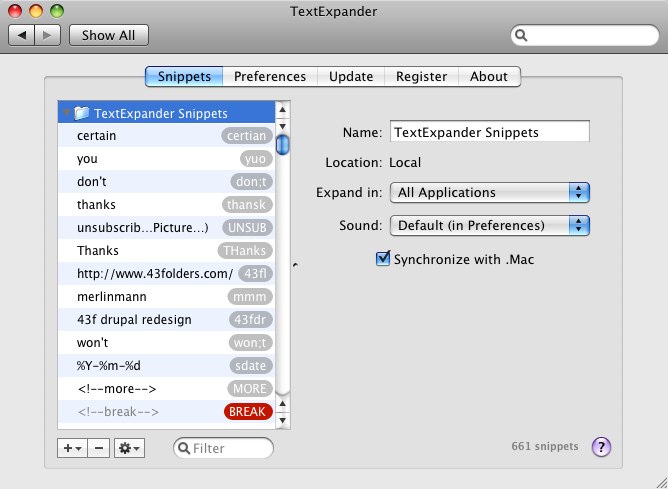
One of my favorite things on my Mac is TextExpander, a PreferencePane that's come up here before and which lets you use text shortcuts for pasting larger blocks of text and graphics wherever your cursor is without batting an eye. Well, SmileOnMyMac has recently released a 2.0 of TE, that adds several useful features, including one that really got my attention:
Mmmm..."Synchronize snippet groups using .Mac synchronization." I like the sound of that one quite a lot. In fact, I wonder if one way to get me whining less about syncing would be for more apps to include built-in .Mac sync. TextExpander had been high on the list of contenders for adding syncing; believe me, you don't want to try and keep 661 abbreviations synced up with spit and bailing wire. Also, for folks who have a large library, the addition of "most recently used" sorting is swell. Also loving the idea of keychain support (although I haven't tried that one yet). If you're the sort of person who's struggling to get faster on your Mac, definitely start with TextExpander. You can shave minutes off every hour with this guy. I probably save an hour a day just not having to fix "thnaks" and "Melrin." Bonus: Here's a MacBreak that Leo and I did on TextExpander: 14 Comments
POSTED IN:
 Whatever happened to Macbreak Video?Submitted by adamqp on October 18, 2007 - 5:50am.
I'm looking forward to using this too, especially the .Mac syncing. .Mac syncing makes my life bearable right now and it looks like Leopard's going to enhance it even further. I use it for making standard comments on document revisions ("This needs to be clearer.", "Perhaps you could expand on this point.", etc.) The only thing that could make it better for me at this point is if it had some of the complex tabbing infrastructure you get with the tab key in Textmate. I've always wondered if that was possible OS-wide with OS X, perhaps using the way the option key allows you to insert accents on different letters. But Merlin, whatever happened to those quick Macbreak video clips? They were really useful and I learned about a ton of new, helpful programs from them. » POSTED IN:
|
|

| EXPLORE 43Folders | THE GOOD STUFF |


