Merlin’s weekly podcast with Dan Benjamin. We talk about creativity, independence, and making things you love.
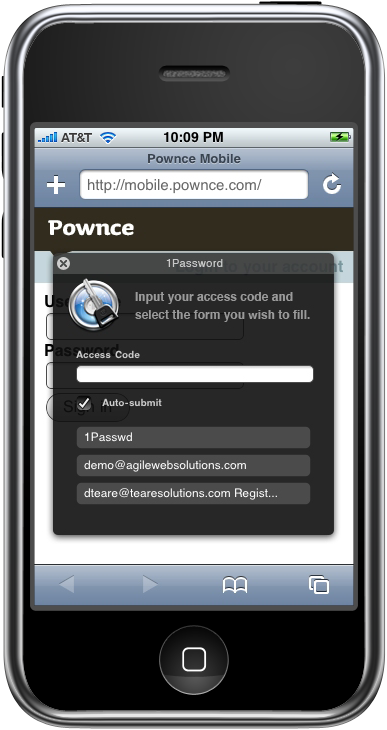
1Password beta: Secure name and password filling for iPhone's Safari
Merlin Mann | Jan 31 2008
Safari AutoFill for iPhone and iPod Touch (Switchers' Blog) Babies, iPhones and very-high-security passwords can be a bitter cocktail; it's really hard to enter a 28-character/mixed-case/special character password on the iPhone while you're holding 15 lbs. of undulating infant. Trust me. So, if you caught video of my recent interview with Agile Web Solutions' Dave Teare, you could see how excited I was to learn about a then-upcoming beta which would support autofill name- and password-entering via secure bookmarklets on your iPhone. Well, the day has arrived, and, brother, am I ever loving this. From Dave's post on the company's blog:
Dave tells me via email that the hosting service he'd mentioned in our interview is still being planned, but, personally I'm thrilled that this "just works" out of the box as well as it does from this first cut. I have seen a few problems in 1P seeming not to remember a login associated with a site, but more often than not, it's been just spot-on -- even when entered with my one, daughter-free hand. Anyhow, check 'er out. 1Password is shareware ($29.95) and a free download. The updated functionality appears to start with version 2.5.10 (build 6102). One of my favorite Mac apps just made life a lot easier for iPhone users. 8 Comments
POSTED IN:
 One of the best apps in the MacHeist 2 bundle!Submitted by jeffwhitfield on February 10, 2008 - 8:00pm.
This is an insanely cool tool! I was real close to using something like KeePassX or Wallet. But after buying the most recent MacHeist bundle and using 1Password for a while, I'm hooked! Best password management software, hands down! Granted, the other two are good for other bits of info but the majority of your personal information can be handled with 1Password. Funny thing is that whenever I show this piece of software to Windows users and show them the integration it has with the iPhone, I always get the same response, "Gee...do they have anything like this for Windows?". Umm...no. » POSTED IN:
|
|

| EXPLORE 43Folders | THE GOOD STUFF |


