43 Folders

43 Folders feed subscription icon - Shiny!Time, Attention, and Creative Work. After 4 years and a lot of productivity pr0n, we’re shifting gears. Re-learn how to use 43 Folders. Then back to work. [»]

”What’s 43 Folders?”
43Folders.com is Merlin Mann’s website about finding the time and attention to do your best creative work.

1Password beta: Secure name and password filling for iPhone's Safari

Safari AutoFill for iPhone and iPod Touch (Switchers’ Blog)

Babies, iPhones and very-high-security passwords can be a bitter cocktail; it’s really hard to enter a 28-character/mixed-case/special character password on the iPhone while you’re holding 15 lbs. of undulating infant. Trust me.

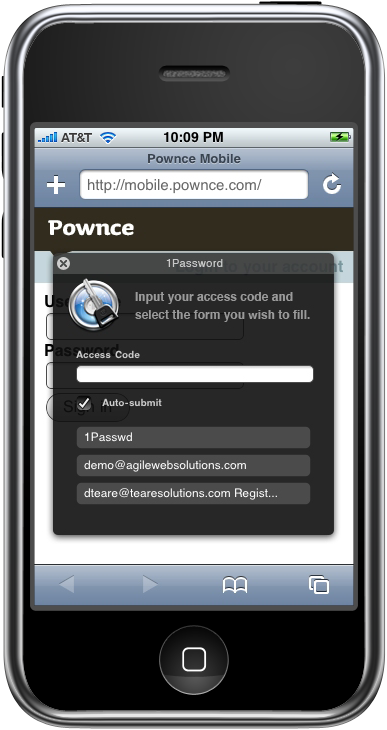
So, if you caught video of my recent interview with Agile Web Solutions’ Dave Teare, you could see how excited I was to learn about a then-upcoming beta which would support autofill name- and password-entering via secure bookmarklets on your iPhone. Well, the day has arrived, and, brother, am I ever loving this.


click to view larger

From Dave’s post on the company’s blog:

Every iPhone and iPod Touch user has cringed when they realized that Mobile Safari does not remember web site logins. Coupled with the fact Copy and Paste is nonexistent on the iPhone, users were forced to type their login information every time they wanted to access any password protected site…

After browsing to a password protected website that requires you to login, simply bring up the Bookmarks menu and select “1Password Logins” to bring up the 1Password AutoFill window…

All the confidential information stored within the bookmarklet is encrypted using Strong Cryptography (448-bit Blowfish encryption) and can only be accessed once the correct Access Code is entered. The confidential information is decrypted within Safari on the iPhone and no communication with the 1Password web servers is required.

Dave tells me via email that the hosting service he’d mentioned in our interview is still being planned, but, personally I’m thrilled that this “just works” out of the box as well as it does from this first cut. I have seen a few problems in 1P seeming not to remember a login associated with a site, but more often than not, it’s been just spot-on — even when entered with my one, daughter-free hand.

Anyhow, check ‘er out. 1Password is shareware ($29.95) and a free download. The updated functionality appears to start with version 2.5.10 (build 6102).

One of my favorite Mac apps just made life a lot easier for iPhone users.


Comment viewing options

Select your preferred way to display the comments and click "Save settings" to activate your changes.
roustem's picture

Detailed 1Password for iPhone Instructions

I just wanted to add that the screenshots and a detailed description of how to use 1Password for iPhone is now available here:

http://switchersblog.com/2008/01/30/safari-autofill-for-iphone-and-ipod-touch-1.html

Brandon_Leedy's picture

Bebes

Merlin, are you saying Eleanor isn’t password friendly? Haha I can hear it now…

“Honey, Daddy needs to enter in his 28 character password and then he’ll change your diaper.(Hands Eleanor an index card with ‘CHANGE ME’ written on it.)”

On a related note, I wonder what a baby would think of an iPhone… I mean learning development through touch interface might be very enlightening to a child, morseo than big buttons at least. Haha, until they get used to it and start wondering why the TV…and everything else doesn’t do anything when they touch it… “Honey, stop touching the TV screen, you’re getting fingerprints all over it!”

Finally, is there anything this secure and easy for windows? Right now Opera for me is by default doing the 1password autofill thing and I’m relying on my firewall (not the windows one, a better one) to keep it safe…still makes me nervous, even if they are harder to decipher…

SJ0s10's picture

1password( Awesome)

Wow! Right after reading this fine post I rushed to my handy ” inquisitor” enhanced google search bar. After a few seconds, I was mounting the 1password dick image and then copied it into my apps folder. Let me now say it is gorgeous. Extremely elegant as the case with many OS10 apps. I can not believe I lived without the awesome app.

Buttons of Hope's picture

Skitch & Squidoo

Yesterday I fell in love on the internet — MM looks like you did too…”bone-rattlingly awesome”.. I call Skitch incendiary — some amazing examples even a bonehead like me could pull off here on my Behind the Button blog today http://makehope.typepad.com/behindthebutton/2008/02/how-to-make-cus.html

Darrel Girardier's picture

1Password

I have been using 1Password for about 3 or 4 weeks and I have say it is an amazing piece of software. I am using it on all of my macs in my house and it makes logging in a breeze.

fabiodebe's picture

I'm crazy for 1Passwd

I don’t even remember how I got to know 1Passwd but now I’m totally addicted to it! Been using for a handful of months now and when I had to bring my Mac into repair for 5 days I felt totally lost without my passwords!! I gave it as a gift to 2 of my closest friends and they’re both very impressed! Haven’t got any feedback about the iPhone compatibility yet but I’m pretty sure it’ll be sweet and seamless! Also, I find that the price is absolutely ok for a useful tool that does the job the way it’s supposed to! IMHO mobile browsing will ever be as big as laptop/desktop browsing but a good point is that managing passwords could be even more of a pain on small devices, so long life to 1Passwd!

manp's picture

I really know how that feels ;-)

LOL - ROFL, that really resonates! Typing on the iPhone one-handed while holding Sofia @17 lbs! I can’t even get the four digit unlock PIN right… BTW she’ll grab the iPhone any chance she gets - good taste. @manp

jeffwhitfield's picture

One of the best apps in the MacHeist 2 bundle!

This is an insanely cool tool! I was real close to using something like KeePassX or Wallet. But after buying the most recent MacHeist bundle and using 1Password for a while, I'm hooked! Best password management software, hands down! Granted, the other two are good for other bits of info but the majority of your personal information can be handled with 1Password.

Funny thing is that whenever I show this piece of software to Windows users and show them the integration it has with the iPhone, I always get the same response, "Gee...do they have anything like this for Windows?". Umm...no.

About Merlin Mann

Merlin Mann's picture

Bio

Merlin Mann is an independent writer, speaker, and broadcaster. He’s best known for being the guy who started the website you’re reading right now. He lives in San Francisco, does lots of public speaking, and helps make cool things like You Look Nice Today. Also? He looks like this, answers questions, and has something like a life.

Merlin’s favorite thing he’s written recently is a short essay called, “Better.”

 
EXPLORE 43Folders THE GOOD STUFF

An Oblique Strategy:
Discover the recipes you are using and abandon them


STAY IN THE LOOP:

Subscribe with Google Reader

Subscribe on Netvibes

Add to Technorati Favorites

Subscribe on Pageflakes

Add RSS feed

The Podcast Feed

Inbox Zero

The original 43 Folders series looking at the skills, tools, and attitude needed to empty your email inbox — and then keep it that way. Don’t miss the free video of Merlin’s Inbox Zero presentation.

Making Time

3-part series on attention management for artists and makers. Read Bad Correspondence, The Job You Think You Have, and One Clear Line.