43 Folders

43 Folders feed subscription icon - Shiny! Drowning in email? Try Inbox Zero to learn sane tips for dealing with high-volume email. And don’t miss the free Inbox Zero video. »

Login or register

Register for free on 43 Folders to comment on articles, post to our forum, customize your visits, and much more. Current users can login now.

"Music Only" for your iTunes playlists

New for Friday 11/10:
Revenge of the Smart Playlist: 5 tricks for packrats & power users »


In my MacBreak Weekly capacity as Vice-President in Charge of Digging Pointless Ratholes™, I recently mentioned some tricks that I use to create better playlists in iTunes. One of these tricks — which is an oldie, and which I’m certain I yoinked from some uncredited smarter person out in the blogtropolis — is to create a “Music Only” list.

So you know how you have increasing buttloads of non-music (podcasts, audio books, etc.) in your iTunes library? It’s really annoying to throw on one of your sexy Smart Playlists or the Party Shuffle, only to have a 20 minute nap or a Noam Chomsky lecture kick in.

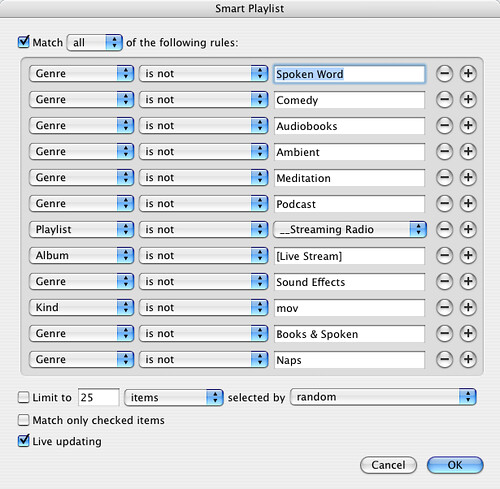
I get around this by basing almost all my Smart Playlists on my one canonical “Music Only” list, which currently looks like this:

Music Only

Yes, it’s very hacky, and yes there’s probably a more elegant way to accomplish this effect, but so far it’s been a handy jumping off point for my favorite Smart Playlists. This helps me build stuff like…

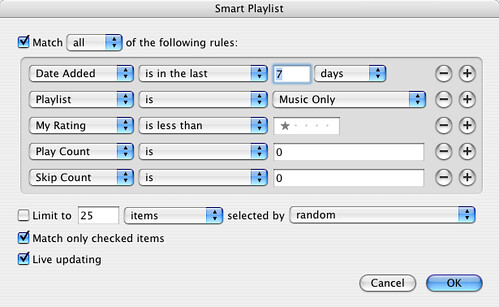
New and unlistened-to

smart_playlists_Last_7_days

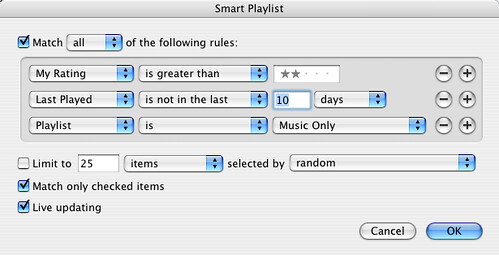
My neglected lovers

smart_playlists_Neglected_lovers


If you’re even a casual iTunes user, it pays to spend some time rating your songs (no they can’t all be “5 stars”), adding rich metadata, and building Smart Playlists. So powerful. And it you’re using a (GUI-free) iPod Shuffle but not Smart Playlists? Man, that’s just nuts.


New for Friday 11/10:
Revenge of the Smart Playlist: 5 tricks for packrats & power users

By popular demand, here are five more Smart Playlists, designed to help you manage very large libraries and bubble up interesting tracks (that you may not realize you like). (more »)


50 Comments

Comment viewing options

Select your preferred way to display the comments and click "Save settings" to activate your changes.
Art La Flamme » Blog Archive » Towards some bett's picture

[...] I love their ?Music...

[…] I love their ?Music Only? for your iTunes playlists entry.?? They are right, in that their answer for “Music only” is indeed ugly — but it looks to work. I’d probably clean it up some but would plan on using it as another filter layer after the star screening and after the Base Radio smart playlist.? Base Radio II, maybe. […]

Smart Playlist - iTunes « gp's picture

[...] “Music Only” for your...

[…] “Music Only” for your iTunes playlists […]

Mike's picture

I've been using the "iTnes...

I’ve been using the “iTnes Radio Station” playlist for almost two years now, which I first discovered here:

http://www.codepoetry.net/archives/2005/01/15/doityourselfsmartradio_station.php

links for 2006-11-12 « seal's picture

[...] “Music Only” for your...

[…] “Music Only” for your iTunes playlists | 43 Folders (tags: iTunes) […]

philosopherdog's picture

Nice post! It would so...

Nice post! It would so much easier if smart playlists allowed you to eliminate any items skipped in shuffle, since my music only list amounts to the same list.

Safepants's picture

Thanks for the tip, a...

Thanks for the tip, a handy time saver I found was to hold shift while hitting the + button to add another argument to the smart playlist. This copies your previous settings.

Tagging songs in iTunes « folleyball's picture

[...] playlist is @1Music (this...

[…] playlist is @1Music (this is a smart playlist containing all music; thanks 43f) […]

JonAtkinson.org » links for 2006-11-10's picture

[...] “Music Only” for your...

[…] “Music Only” for your iTunes playlists | 43 Folders Useful! (tags: 43folders apple ipod itunes mac music organization tips playlists software) […]

beaman » Blog Archive » “Music Only” for your iT's picture

[...] 43 Folders ...

[…] 43 Folders Posted by Beaman Filed in This blog, Apple, OSX, iTunes, iPod […]

captainjaroslav's picture

God, I could discuss iTunes...

God, I could discuss iTunes metadata and smart playlists for hours! No, really. I use a lot of what other people have mentioned, though I’m not so into ratings. I might make a note to delete something that I really hate (on the Hipster PDA perhaps?) and then delete it later, but I also find that some music grows on me and I like to keep it around. Some things I do that haven’t been mentioned yet are:

Playlists based on when items were added to the library, so I can hear stuff that is “new to me”.

Playlists based on how recently I’ve played something. This keeps everything fresh and insures that I never get that feeling that my “random isn’t really random” (a false but common perception) because songs are removed from the playlist as soon as I play them and sent to the bottom of the pile. I have one playlist that’s my 100 least recently played songs, if I really want to go back, but then I have a music-only (also minus holiday music) playlist that’s limited to the 20gb of least recently played stuff out of the 70gb of mp3s that I have on my machine.

The “comments” field is nice, too. I added a custom tag to all of the music that my wife doesn’t hate, which is really helpful. Also, I have holiday music that is classical, hip-hop, rock, jazz, etc. So, instead of using “holiday” or “Christmas” as a genre, I put “xmas” in the comments field. I wish someday Apple would add a way to use a controlled list of tags to append to a file, kind of like how “genre” works, with an auto-complete feature, except that you could add more than one to a track.

I have a “podcast” playlist that is set up to compile all of my podcasts that aren’t from KEXP (the world’s best radio station and the only music podcasts I currently subscribe to) where the play count is less than one. This allows me to just hit play and listen to one podcast after another rather than selecting them individually. (My podcast subscriptions are also set to automatically update every hour and delete themselves when the play count is greater than zero, so I never have a backlog of out-of-date ‘casts hogging up my disc space.)

Most importantly, and here’s where the fact that I’m a librarian/metadata specialist by profession really becomes obvious, I strictly control all the metadata in my library. Whenever I add new stuff to the library, it goes into a special “dumb” playlist and waits for metadata additions and corrections. Most importantly, people use the stupidest genres to tag things. For god’s sake, what use is it to call something “unclassifiable”? Genre headings should, of course, be based on the particular needs of your collection. If 1% of your music is classical, then it’s probably not important to worry about subdividing it into “baroque” etc. When a genre gets to big, think about subdividing it, though. I created my own genres that work like this “Rock.Punk.Hardcore” or “Reggae.Dub” so that I can play a fairly specific genre or use a smart playlist to select songs where the genre “contains” (as opposed to “is”) reggae. That way I can easily pull together the larger “umbrella” genres. Geek on!

dan's picture

I'm jealous want a job...

I’m jealous want a job with the title “Vice-President in Charge of Digging Pointless Ratholes™”. Now having said that, thanks for the tip. I never thought of this and I’ve long wanted a way to easily sort out podcasts and movies from the music.

andy's picture

I used to go through...

I used to go through all the pain of doing this. I’ve since download The Filter ( www.thefilter.com ) and it builds me music based playlists without feeling like a iTunes boffin.

Wolf Notes » Blog Archive » 43 Folders iTunes Sm's picture

[...] 43 Folders teaches you...

[…] 43 Folders teaches you how to discover your music again using iTunes Smart Playlists.  There’s also a follow-up. […]

Marc's picture

No Stephen, I use the...

No Stephen, I use the Selection checkboxes too. What would make them easier to use, though, would be a per-podcast setting that auto-flagged the downloads as either checked or not-checked (in my particular case, most of my spoken-word stuff happens to come via podcasts).

As for rating my music, I use a variation of a rating system that I learned about a few years ago. Our company was going through a period of rethinking what the hell we were doing, and a consultant was called in to help us focus on our core processes. We had to make a list of all the things that we were currently occupied with, and then rate their importance on a scale of 1 to 10. The interesting part was that we were only allowed to give each item a rating of 1, 3 or 9. This was a great way to cut through the crap of “is this just as important as that, or slightly more important, or slightly less important?” Things are either not important at all, slightly important or logarithmically more important.

Thus, I rate my songs simply as 5 star (really good), no stars (worth keeping) and deleted (why waste disk space?).

k's picture

I have a couple of...

I have a couple of these smart playlistst that uncover songs I never play, or songs that I play often but have no rating. I collect these playlists in a folder called “mining”.

Dadblog » Anal iTunes (or, why music is important, but's picture

[...] See, I thought it...

[…] See, I thought it was just me. Having read Merlin Mann’s discourse on using smart playlists and stuff to organise your iTunes and iPod listening, I’ve realised that when it comes to being anal about iTunes, I am a complete amateur. Merlin describes how he has a playlist for “only music”, a playlist for “unlistened and unrated” and a playlist for “old favourites I might not otherwise listen to.” […]

Nic's picture

to get video and podcasts...

to get video and podcasts out of your playlists try this:

kind, does not contain, movie kind, does not contain, video podcast, is false

jeri's picture

too complicated, just build playlists...

too complicated, just build playlists online and bring them down later with finetune.com or seeqpod.com

Mike H's picture

If you're like me, and...

If you’re like me, and all your podcasts are single songs (no radio shows, no spoken word), this playlist is useful:

“All Music” Match Any: - Podcast is true, or - Playlist is Music

That way you can party shuffle through all your music, regardless of how you got it into iTunes. There is some kind of “Podcast” flag that Apple sticks in files you get via subscription, and you can’t remove it by editing metadata or re-importing the file. Very annoying.

Press [F8] to continue… » Blog Archive » i's picture

[...] In the most recent...

[…] In the most recent Macbreak Weekly podcast, Merlin Mann mentioned some of the smart playlists he uses for managing his iTunes library better.  He’s since written up a short guide. […]

Tom's picture

Thanks Merlin for posting this...

Thanks Merlin for posting this up. This gives me some ideas so I can make adjustments to get my music playlists right.

ian's picture

the one smart playlist i...

the one smart playlist i have not been able to figure out is how to make a playlist of random complete albums from a single genre. If you go in and create a smart playlist whos rule is contain genre rock, selected by album it will grab the albums in alphabetical order.

Is there a way to make a playlist of random complete album from a single genre?

BrianAndPamela.com » Poke iTunes a bit and make playli's picture

[...] “Music Only” for your...

[…] “Music Only” for your iTunes playlists | 43 Folders […]

Adam's picture

Have a look at this......

Have a look at this… http://adam.slapjack.com/blog/do-it-yourself-smart-radio-station/

I found this guide to creating Smart Playlists a while back and I swear by it.

hopefully the day will go a little faster with some linkage's picture

[...] nifty-cool ideas for iTunes smart...

[…] nifty-cool ideas for iTunes smart playlists. I’m going to have to try some of these when I get a chance; there’s a lot of music on le pod that doesn’t get listened to with any sort of frequency. […]

Christopher Allen's picture

I have a lot of...

I have a lot of tips about how to better use iTunes ratings, and various tricks to make rating your collection less laborious. It is located in my blog entry “Using 5-Star Rating Systems” http://www.lifewithalacrity.com/2006/08/using5starrat.html

JonAtkinson.org » links for 2006-11-10's picture

[...] “Music Only” for your...

[…] “Music Only” for your iTunes playlists | 43 Folders (tags: 43folders apple ipod itunes mac music organization tips playlists software) […]

Revenge of the Smart Playlist: 5 tricks for packrats & p's picture

[...] The success of yesterday’s...

[…] The success of yesterday’s post on the basics of Smart Playlists makes me think you might enjoy seeing a few more. So, today I want to show you how to get control of a very large iTunes library — to save space by getting rid of stuff you’re not enjoying or listening to, as well as bubble up stuff you may not even realize you like. […]

communicatrix's picture

It’s really annoying to throw...

It’s really annoying to throw on one of your sexy Smart Playlists or the Party Shuffle, only to have a 20 minute nap or a Noam Chomsky lecture kick in.

Speak for yourself, bub. Some of my most successful seductions have unfolded to the dulcet tones of Noam Chomsky.

A Frog in the Valley » Blog Archive » [Frog Trai's picture

[...] “Music Only” for your...

[…] “Music Only” for your iTunes playlists | 43 Folders […]

 
EXPLORE 43Folders THE GOOD STUFF

An Oblique Strategy:
Discard an axiom


STAY IN THE LOOP:

Subscribe with Google Reader

Subscribe on Netvibes

Add to Technorati Favorites

Subscribe on Pageflakes

Add RSS feed

The Podcast Feed

Inbox Zero

The original 43 Folders series looking at the skills, tools, and attitude needed to empty your email inbox — and then keep it that way. Don’t miss the free video of Merlin’s Inbox Zero presentation.

Get Started with ‘GTD’

David Allen’s popular productivity book and the system on which it’s based help turn ‘stuff’ into actions that support valuable outcomes.