43 Folders

43 Folders feed subscription icon - Shiny! Drowning in email? Try Inbox Zero to learn sane tips for dealing with high-volume email. And don’t miss the free Inbox Zero video. »

Login or register

Register for free on 43 Folders to comment on articles, post to our forum, customize your visits, and much more. Current users can login now.

Path Finder: More than a Finder replacement

Cocoatech: Path Finder 4.6.1

Given the comments and emails I receive whenever I use Path Finder in a demo, it’s clear to me that people are hungry for ways to improve and customize their stock Finder. PF’s appearance in my latest MacBreak has been no exception.

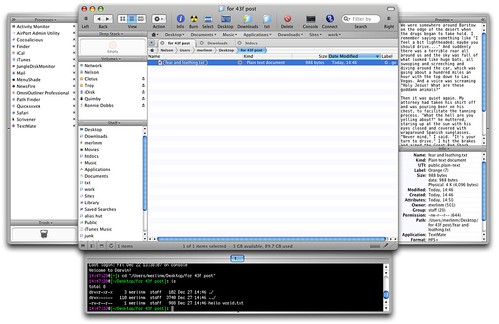
So, for folks that haven’t heard my pimping before or who haven’t been following the recent additions to the inarguably crufty uber-app, here’s a tricked-out Path Finder window, showing the new tab functionality, plus all the optional drawers, tchotchkes, and finials that can be displayed.

Path Finder 4.6.1

(Larger version on Flickr…)

For more on why I dig Path Finder, read 7 things I like about Path Finder for OS X. And be sure to check back soon on MacBreak (HD 1080 Podcast feed); Leo and I have a segment on Path Finder that should be airing soon.

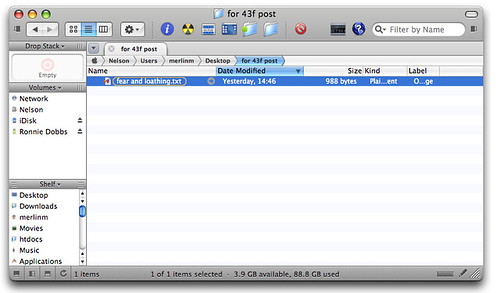
Addition 2006-12-28 10:31:43 Neil makes a great point in comments. I have this terrible habit of only ever showing Path Finder with all of its features on, and all its optional frippery enabled. In fact, PF needn’t look like a functional salad bar at all, and the enclosed is closer to how I configure it for my own everyday usage.

Path Finder - everyday use

Thanks, Neil.


Comment viewing options

Select your preferred way to display the comments and click "Save settings" to activate your changes.
Dave M.'s picture

Steve, I currently use it...

Steve, I currently use it “with” the Finder. DragThing will use PF instead of Finder when opening disks and other folder links, when configured to do so.

I personally still dump files on the desktop, but the Drop Stack is a great way of moving files from one location to another. It’s like an iClip for files.

It’s jam packed full of useful things that I almost can’t live without.

PathFinder doesn’t really help you organize your files any easier than the Finder does. You still need to do that on your own. PF just makes it easier to deal with the file structure you come up with.

A band-aid for the Finder « Isn’t that special's picture

[...] A band-aid for the Finder...

[…] A band-aid for the Finder Yes, the Finder could be better. I think many of us are hoping that the next OS release brings tabbed finder views and a simple way to deal with moving and viewing files. But until that day comes, there is Pathfinder by Cocoatech (PF4). It’s been touted on 43Folders a couple of times, here and here. Cocoatech have produced a quality product that feels right at home on my desktop. It takes some practice to get used to it though, so I’ll outline some cool features here. […]

steve mcfarland's picture

My big question for PF...

My big question for PF users: you guys are running this instead of the Finder and launching at login?

And what is the advantage for me in hiding my desktop? Where are you dumping new files?

I’m desperately in need of a logical document & file management structure and something in me feels like this could be the solution.

StuckInQwerty's picture

Hi MM~ Thanks for...

Hi MM~ Thanks for making my world a more GTD place!

The thing that intrigues me about the programs you pimp is their hybridization at the meta level. That is, how does kGTD (c’mon OmniFocus!), DevonThink, QS, PathFinder, iCal, etc. fit into your system at the level of integration? Have you sorted out QS to DThink? (Please please please share soon!) How do you sync your “(D)Think’?

Oh, and what browser do you use? While i love the idea of using ‘services’ from safari (or camino) to say DThink or VoodooPad, the add-ons to FireFox have kept me there (and cocoa is coming for FF3!) How do you surf?

Anneliese's picture

Eloy, command click on the...

Eloy, command click on the folder name at the top of the Finder window, and that will give you the path length.

Eric's picture

Kudos for the "Fear and...

Kudos for the “Fear and Loathing in Las Vegas” reference. As a journalist aspiring to reach Gonzo some day it’s nice to know you’re reading good material.

TommyW's picture

It does have a large...

It does have a large footprint and it needs a good CPU. To be honest it really only came into its own with my new MBPro. That said, I used it, in preference to not using it, on my old G4 667Mhz Powerbook, but there were times I opened a new Finder window while PF sent that beachball spinning…

I bought it about 1/3 of the way into the trial period, being a pretty skeptical commentator on Merlins initial post way back. I thought it was overpriced, but it’s not, it’s great.

I love the Preview pane for word and text docs, I love the Drop Stack, I love the myriad options the contextual menu gives me which Finder doesn’t, I love the Size Browser which duplicates the functionality of OmniDiskSweeper, I love the Terminal drop down pane, I love the multiple shelves, the new inclusion of Tab sets which permits you to set up workspaces (please combine with window setups and I’m a happy bunny…)

Eloy Ramirez's picture

I recently switched my work...

I recently switched my work and process over to my macbook pro. One of the things that drives me crazy is that I cannot find a way for Finder to display the folderpath (not just the current foldername). I am a Photographer and copying files to 3 locations gets confusing. Path Finder does the job much better…but I wish Finder did it inherently.

Peter Morgan's picture

Pathfinder is great - although...

Pathfinder is great - although it takes a while to configure and simply get used to the myriad of options available to you. I would recommend anyone to try it free for thirty days first as it can be a little overwhelming. Set it up carefully and it’s a huge improvement over the standard finder.

Jeff Shell's picture

I want to like PathFinder,...

I want to like PathFinder, but it’s just way too busy. I see that screen shot with all of the drawers and tabs and splits and what-not and my head explodes.

I haven’t tried PathFinder 4.x, but a major annoyance (for me) about earlier versions was that the context / action menu wasn’t intelligent. It didn’t filter things out like the Action menu in the Finder does. As such, I was presented with many more actions than I could actually perform on a particular item or set of items. Maybe this has been fixed, I don’t know. But between the minor annoyance of having two file manager applications running simultaneously and the over-glut of features in PathFinder, I could never latch on. It was just too distracting.

I find it interesting that you’re such a big fan of PathFinder, given how much this site seems to emphasize removing/hiding unnecessary distractions. My experience with PathFinder was more frustrating and distracting than it was helpful. But you may live and work in the file system more than I do.

Personally I find that QuickSilver + Finder, especially when using Triggers, has been a powerful combination. Beyond that, I tend to prefer more specialized file management to come from more dedicated applications: GraphicConverter’s folder browser for working with images; assorted audio utilities for digging through large folders of samples and audio snippets; TextMate’s open-folder-as-project mode for working with big hierarchies of source code; GoLive’s site manager for managing personal web sites; etc…

I think that PathFinder is decent software, but it just hasn’t worked for me.

Arthur Vanderbilt's picture

I want that text file...

I want that text file when you’re finished typing it in.

Between the PathFinder bottom drawer, Visor, and Aquamacs I don’t open very many terminal windows any more.

I use the bottom drawer a lot for ./configure make sudo make install.

jhn's picture

Ugh. Pathfinder comes in...

Ugh. Pathfinder comes in handy sometimes but it just tries to do too much. Whatever happened to small pieces, loosly joined? Why does it have its own text editor and terminal?

Eloy Ramirez's picture

the one thing I wish...

the one thing I wish Finder would do is give me the folder path (not just folder name) at the top of the window. I am a Photographer and when I am copying/moving images from my media to my MBP, I always have to scroll or click back to find out which window is which folder. This task was easy to do in Windows. I use Path Finder for this reason alone.

coyote4til7's picture

Unfortunately, the 'larger image' link...

Unfortunately, the ‘larger image’ link takes you to a yahoo login. It must be a really special super secret image!

Neil's picture

Thanks for the props, Merlin!...

Thanks for the props, Merlin! I wanted to pop in to make a point, though. I see a number of reviews of Path Finder that have this “all-dressed chip” screenshot and it’s important to note that that this is not the standard configuration. Path Finder’s first launch experience doesn’t smack you in the face with every single drawer open and doo-dad turned on.

It’s like seeing a screenshot of Photoshop for the first time that has every single palette open — if you wanted to set it up like this, you could. The point is that Path Finder gives you the option to customize it how you like, but like Photoshop or any other complex application the bits you don’t want to use are out of the way unless you need them.

funkright's picture

Now, you would think, with...

Now, you would think, with the exposure you’ve given this app that the apps creator would offer a special price when linked through your site… I like the app, but $35 for a file manager (yes I know it does soo much more, but..) is a bit of a stretch for me to justify..

Dave M.'s picture

Has anyone noticed that Path...

Has anyone noticed that Path Finder’s memory footprint is a bit big? I tried to keep it running as a replacement to the finder. However, as it runs, even when there isn’t a window open, it seems to take up more and more memory.

I have also had it crash a few times too often for my tastes.

On the other hand, it’s got some truly amazing features! Really.

I’ll keep trying. Maybe I’m just doing something wrong.

scralpha's picture

I also tried Path Finder...

I also tried Path Finder for a while. Being a recent convert from Windows, I found the Finder entirely confounding. PF looked like just the thing, so I gave it a shot, and found it far too Windows-like for my tastes. It just took too much fiddling to get what I wanted. Very capable, well-done app, just a bit of feature bloat in my opinion. I think a ‘PF Lite’ with just the basics (tabs, drop stack, most of the Finder’s functions) and a reduced price would suit a lot more people. LIke a finder-supplement rather than a replacement. Eventually I discovered Quicksilver (through this site), and just got used to using the Finder in combination with other small apps, and I’m happy with that.

@Eloy R. Cmd-click the Finder window title to see its path.

Marc Orchant's picture

Agreed. I generally try to...

Agreed. I generally try to stick to my guns and use a shareware product for the full trial period before making a purchase decision but I bought a license for PF after two days. The Finder is shut off and I am infinitely more productive and less cranky using PF for my navigation, file management, and application launching. There are, to be sure, a few rough edges here and there but overall I give this app my highest rating. Combined with Spirited Away (another Merlin recommendation), I am working on a much less distracting Mac OS than ever before. Looking forward to you and Leo diving into PF in greater depth.

PathFinder video demo on MacBreak | 43 Folders's picture

[...] As promised, here’s the...

[…] As promised, here’s the latest video podcast episode of MacBreak, in which Leo and I have a look at PathFinder, an application by Cocoatech that (in my opinion) handsomely compensates for many of the deficits in the current OS X Finder. It also has a ton of cool features, preferences, and geegaws that most any Mac nerd will love. […]

About Merlin Mann

Merlin Mann's picture

Bio

Merlin Mann is an independent writer, speaker, and broadcaster. He’s best known for being the guy who started the website you’re reading right now. He lives in San Francisco, does lots of public speaking, and helps make cool things like You Look Nice Today. Also? He looks like this, answers questions, and has something like a life.

 
EXPLORE 43Folders THE GOOD STUFF

An Oblique Strategy:
Distorting time


STAY IN THE LOOP:

Subscribe with Google Reader

Subscribe on Netvibes

Add to Technorati Favorites

Subscribe on Pageflakes

Add RSS feed

The Podcast Feed

Inbox Zero

The original 43 Folders series looking at the skills, tools, and attitude needed to empty your email inbox — and then keep it that way. Don’t miss the free video of Merlin’s Inbox Zero presentation.

Making Time

3-part series on attention management for artists and makers. Read Bad Correspondence, The Job You Think You Have, and One Clear Line.