43 Folders

43 Folders feed subscription icon - Shiny! Drowning in email? Try Inbox Zero to learn sane tips for dealing with high-volume email. And don’t miss the free Inbox Zero video. »

Login or register

Register for free on 43 Folders to comment on articles, post to our forum, customize your visits, and much more. Current users can login now.

Kick procrastination's ass: Run a dash

Procrastination can drive most of us into a spiral of shame that’s as mundane as it is painfully personal. We know what we should be doing, but some invisible hang-up keeps us on the line. Unfortunately, the guaranteed consequence of procrastination is growth in the scale of the task you’ve been putting off—as well as the anxiety that it creates. All the time you’re putting something off, your problem’s getting bigger—both in reality and in your head, where your colorful imagination is liable to turn even the most trivial item into an unsolvable juggernaut that threatens to overwhelm you. And that means extra stress, more procrastination, and the music goes round.

My favorite tonic for procrastination—which I have mentioned in passing previously—is what I call a dash, which is simply a short burst of focused activity during which you force yourself to do nothing but work on the procrastinated item for a very short period of time—perhaps as little as just one minute. By breaking a few tiny pebbles off of your perceived monolith, you end up psyching yourself out of your stupor, as well as making much-needed progress on your overdue project. Neat, huh?

Why the Heck Should This Work?

By making even the most modest bit of progress on your hated task, you’ve done what once seemed impossible: you got started. When you realize how much of the anxiety you’d experienced was created in your head, you’ll experience huge relief and give yourself the jolt needed to get back on track.

You can do a dash any time and for virtually any kind of project. The task has not been conceived that cannot be made smaller and more dash-able.

Three kinds of dashes
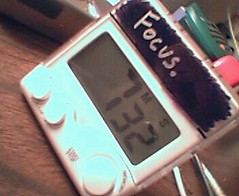
Time your dash

Try using a kitchen timer
to run your time-based dash.

Plan your dash based on whatever works best for both your project and the particular block that’s hanging you up. The key is to pick a goal that’s laughably modest. Seriously, this is not the place for extravagant predictions and overly ambitious goals (that’s probably what helped land you here, right?).

  • Time-based dash - Most jobs lend themselves to a time-based dash, so pick up a kitchen timer at your local drugstore. Choose an amount of time that gives you enough room to do something but that’s brief enough to seem completely unintimidating. For some reason, eight minutes seems to work well for most of my own dashes.
  • Unit-based dash - Alternatively, depending on the tasks you’ve been avoiding, you could go with a unit-based dash, during which you agree to plow through an arbitrary number of pieces associated with your project (such as pages to read, words to write, glasses to wash, etc.).
  • Combination dash - In many cases, the best solution is a combination dash, in which you get to stop the hated work whenever you reach either the time or unit goal first.

Above all, remember that this is all about doing something, so pick a goal at which you can’t possibly fail.

Some Sample Dashes

Here are a few ideas to get you started, although dashes can work for virtually any project you’ve procrastinated—no matter how monolithic.

  • Messy garage - Goal: 10 minutes or 1 full garbage bag. Spend 10 minutes working in one area of the garage. Take out old papers, break down some boxes, or move the Christmas ornaments to the top shelf. When the timer buzzes at you, stop.
  • College application - Goal: 5 minutes or 1 page. Start by filling in the easy boxes. If you reach the bottom of the page before time is up, stop.
  • Overdue report - Goal: 10 minutes or 100 words. Just start writing, even if it’s complete crap. Just keep scribbling for 10 minutes or until you have a paragraph or two. When time’s up, stop.
  • Holiday cards and family correspondence - Goal: 5 minutes or 2 notes. Grab a pen and start making with the nice. Tell them about Tyler’s big day at Computer Camp. Brag about Ashley-Marie’s jazz and tap recital. When you’ve hit two finished cards, stop.

Feel Like Working More? Well, do ya, punk?

Once you’ve made any progress on something you’ve been procrastinating—even the ridiculously minor amounts of progress you make in your dash—you might find it irresistible to keep working at it. That’s okay. Seriously, go nuts.

Although you must begin your dash with the confidence that your life preserver is never more than a few minutes or units away, there’s nothing to stop you from paddling forward if you’re making happy progress. That’s the trick, and, believe it or not, it totally works. Give it 8 minutes, and find out for yourself.


Related Stuff

Technorati Tags: , , ,


38 Comments

Comment viewing options

Select your preferred way to display the comments and click "Save settings" to activate your changes.
Dominic's picture

I use a similar concept...

I use a similar concept that I call “Fill your hands”. It’s a technique I learned from trying to pick up after two toddlers who indiscriminately strew objects around my house in a surrealistic tableau. I go around the room and “fill my hands” with as many random objects as I can hold, then one at a time put those objects wherever they belong until my hands are empty, then fill them again. It’s much more effective than simply staring at the mess and wailing “Where do I start?” In business, I have taught myself to apply the same concept. When I have so much work that I don’t know where to begin, I will abandon priority and simply “fill my hands” with a number of tasks (e.g. by dumping all my paperwork on my desk and attacking it one page at a time) and work until my metaphorical hands are empty.
One important trick to doing this is to not allow anything new into the process flow until you are ready…ignore phone calls, put off visitors, don’t even look at new paperwork. Otherwise, it is easy to become distracted from the “dash” or the process of emptying your hands. I find that doing this leads to a greater sense of satisfaction with my day, and lets me start the next pile of work with a little more energy and determination than I had prior to tackling the heap.

Ryan Stewart's picture

The timing of this article...

The timing of this article is impeccable! I just came off a dash (though I didn’t call it that) to take care of some call reports I have been putting off for a couple of days. Right now I’m taking a break before I start another dash to take care of call reports I’ve been putting off for a couple of weeks.

Because most of my procrastination comes in the form of surfing the web, reading RSS feeds, or checking email, I’ve found that the most effective tool to curb my procrastination is the temptation blocker. It’s kinda like your kitchen timer idea in that it blocks “tempting” programs (you decide which programs) for X minutes (or hours) so that you can get things done. I may have seen the link to it here originally but if I haven’t it would make for a great post. By the way, it’s free!

Thanks for the great site Merlin.

Dave Gray's picture

Great post! I will definitely put...

Great post!

I will definitely put this one into action. I seem to procrastinate on making decisions, even little requests, like “When can we do a call next week?”

A decision seems so final and has a tendency to close out other options.

Email and calendar commitments seem especially conducive to procrastination, at least for me.

Small requests or action items seem to hang around in my inbox — and pile up — because I can’t decide how to act on them or don’t want to commit to it yet.

Here are a few “dashes” you might want to add to your list: - The email dash: Go through and answer/deal with everything. If no response is required, spike it. - Calendar dash: Book the next two weeks, including “down time” and/or “work time.” Then stick to it.

Dan Hartung's picture

This is very much the...

This is very much the type of approach recommended for people buried by clutter, e.g. at FlyLady.net, primarily aimed at housewives. FlyLady offers advice, a calendar, even e-mail reminders to keep you focused. The main concept is dividing your house into “zones”, then commit to dealing with one zone for a particular period. There are also strategies like the “hot spot” (keep one area clear at all times), the “5 minute room rescue” (run around dealing with the worst problems, but only for 5 minutes) and the “27 fling boogie” (throwing stuff out). If that’s too cute for you, these are some other sites with similar advice:

There’s also a must-see clutter horror stories site that’s more for basic getting started than really getting organized, but it doesn’t have its own URL and I can never find it.

korinthe's picture

Dan Hartung, were you thinking...

Dan Hartung, were you thinking of the “Squalor Survivors” website?

I originally came to 43F via http://www.organizedhome.com. (Flylady’s too purple for me.) If you are heading over to OH.com, don’t stop at the article and forms on the website — the real treasure there is the set of big, 24-7-activity message boards.

My version of “fill your hands” is setting a timer and seeing how many displaced things I can put back in their proper homes in the ten minutes or whatever before the timer goes off. It usually makes a huge difference around the house. At work, well… I am still looking for the procrastination-killer. GTD helps, timed dashes help, pagecount dashes help, but at many tasks I still feel like a slug.

Scott Johnson's picture

I tried the "unit-based dash"...

I tried the “unit-based dash” a couple of days ago, prior to reading this article. That’s why this article spoke to me so much—I had applied the techniques just before reading about them. The technique worked very well. I told myself that I would just work until part of a particular task was complete. I did and excellent job of chipping away at my project, and procrastination was defeated that day. Nice.

Kayvaan's picture

This works! My variation of this...

This works!

My variation of this technique works like this:

Say I’m writing a paper (I’m in an MBA program right now). If I find myself procrastinating, and I become conscious of it (it’s such a perniciously unconscious thing sometimes) I force myself to create the file on my computer, name it, create the title page, the headers, footers, etc. This physical act of starting the paper a) makes me feel like I’m already half done and b) usually is enough to kick start me. Not always, but usually. Alternatively, just forcing myself to write one line usually breaks the block.

Anyway, the problem is sometimes I forget this technique or am just in such denial that I don’t admit to myself that I’m procrastinating.

Actually - I should be writing a paper right now.

KG

J|RSHAW's picture

This is a nice little...

This is a nice little countdown timer app for the mac:

Minuteur

“To my mind, this has become that very rare thing, a perfect app. It has only one aim: to be a short-term timer, but it has that function covered from all angles, and achieves it in the most elegant way imaginable. It can be controlled from keyboard and/or mouse, it can count up down or sideways, but remains simple to look at and to use. And it is free! I can really think of no reason not to have this on your Mac. Nick Sloan - VersionTracker”

http://www.apple.com/downloads/macosx/productivity_tools/minuteur.html

Ennis's picture

I have problems with dashes...

I have problems with dashes and cleaning. I can do 10 minutes, but then I run out of steam. It rarely leads to something bigger and sustained, and given how much cleaning there is, a little bit just leads to disappointment.

I know - it would be positive to say: “Look how much you did!” but really, if you’re scooping handfuls of sand out of a dune, it’s not that encouraging at all.

This helps me with work, but not cleaning … cleaning takes too much stamina, and takes too long before I see results. Feh.

secretGeek's picture

>All the time you’re putting...

All the time you’re putting something off, your problem’s getting bigger—both in reality and in your head

Very often true Merly-baby. But sometimes, just sometimes, you ignore it and it really does go away!

(for example… if you keep putting off the writing of your will, you eventually won’t need one)

Birgit's picture

On a PC you can...

On a PC you can use PizzaTimer http://www.mp3timer.com/ or Minute Timer http://www.pc-tools.net/win32/mintimer/ - both are freeware.

I apply this method, too. It’s either 2 minutes (inspired by GTD) or 15 minutes (inspired by Flylady) and makes life much easier

Louise's picture

So glad to see people...

So glad to see people making the Flylady link. I agree, it’s a little too purple sometimes, but in a weird way that got past my perfectionism about cleaning — its very goofiness made it less intimidating, somehow. And I find her emails helpful in much the same way that GTD is. The key concept for both is just to find the next SMALL thing to do, and then do it! But I have to go now — I’ve been reading about procrastinating instead of doing an overdue writing assignment….But really, I’m not procrastinating myself, I’m just observing other people’s procrastination. In the interest of social science. You know.

ladygoat's picture

I used to do this...

I used to do this as a teenager to get my younger siblings to clean the house in a timely manner. I would put a record on high speed, and get things done by the time the song or album finished.

Creed's picture

It reminded me of the...

It reminded me of the Procrastinator’s Prayer:

“Lord, help me put off procratinating just for the next 15 minutes.”

Elf M. Sternberg's picture

I have long searched for...

I have long searched for the perfect timer, and have long ago given up. Because of the need for intrusive interruptions I still carry a Palm M500 which will chirrup as needed, but such timers just don’t work for dashes.

BigClock is an excellent timer that many people like for this purpose, but I’ve found that a better choice, for me at least, is Pocket Doan, a “meditation timer” that allows you to do such things as segment your dashes into periods, provides both a 2-minute warning and an end-of-dash note, and can be made to pause or cycle through sessions at will.

While I understand the original purpose of PocketDoan and its use in zazen, I find dashes to be particularly meditative in and of themselves, especially when they’re of non-geek stuff like housework. I like housework, it’s an affirmation that I care about myself and my family, but it’s frequently hard to convince myself to start. Choosing “clean kitchen” or “weed backyard” from the list of “meditations” in PocketDoan encourages me to get started, sets a definite limit after which I can go back to geeking (a reward!), and provides a subtle affirmation that what I’m doing is valuable and desireable. It’s up to me to add the well-articulated part by putting the action into the database in the first place.

As an added benefit, BigClock and PocketDoan are both freeware. BigClock is even distributed under the GNU Public License.

Blaine Kendall's picture

This inspired me to do...

This inspired me to do my bill filing over the weekend. All the bills I’ve paid since January have been sitting on my desk piling up. I finally just decided to dig in and attack the problem. I even lasted past 8 minutes and just completed the whole thing in about an hour. It was just the hurdle of getting started that made it hard. Reminds me as well of Joel Spolsky’s Fire & Motion article. The hardest thing is just to start, but you have to “just do anything” to get started and it’s easier from there.

Solomon Folks's picture

I frickin love it!...

I frickin love it!

tim's picture

I like ideas like these...

I like ideas like these because many of us don’t understand the power of motivation and momentum. When we have a small sense of accomplishment, it gives us the energy to continue in the same direction.

This helps us to overcome the tendency to try and feel our way into acting - and moves us closer to - acting our way into feeling.

GreenYoda's picture

You just inspired me to...

You just inspired me to flatten a bunch of boxes for recycling. It really seems to work. Thank you, thank you!

Lifehacker's picture

Beat procrastination with a dash Productive...

Beat procrastination with a dash

Productive person Merlin Mann says the worst case of procrastination can be remedied with what he calls a dash, or a short burst of focused activity. Say “cleaning out the closet” has languished, untouched, on your to-do list for months….

Brad's Link Blog's picture

43 Folders: Kick procrastination's ass:...

43 Folders: Kick procrastination’s ass: Run a dash

43 Folders: Kick procrastination’s ass: Run a dash: Technorati Tags: Blogging, GTD, Tips

BradHeintz.com's picture

A Couple of Links I'm loving...

A Couple of Links

I’m loving Merlin Mann’s latest anti-procastinatory musings over at 43 Folders. I’m hating FEMA. That’s all for now. A proper update, and a belated answer to Scott’s call-out, to come soon….

Rich Seymour's stochastic statements.'s picture

Do something, anything. Given that the...

Do something, anything.

Given that the President of the United States of America was playing an approximation of a G-chord one fret too high on his presidential cutaway acoustic while New Orleans flooded, its easy to see how procrastination gets the better of us. Well maybe…

Just Hack's picture

Overcoming Procrastination I love GTD and...

Overcoming Procrastination

I love GTD and the tenet to write everything down and get it out of your head. That

scottandrew.com's picture

links for 2005-09-09 43 Folders: Kick...

links for 2005-09-09

43 Folders: Kick procrastination’s ass: Run a dash One day I’m going to write a post about all the tools I use to get my music biz stuff done. The key is to break tasks down into subtasks so…

scottandrew.com's picture

links for 2005-09-09 43 Folders: Kick...

links for 2005-09-09

43 Folders: Kick procrastination’s ass: Run a dash One day I’m going to write a post about all the tools I use to get my music biz stuff done. The key is to break tasks down into subtasks so…

David V. Lorenzo's picture

Running Your Way out of...

Running Your Way out of A Rut

This comes to us from 43folders by way of Achieve-It. My favorite tonic for procrastination—which I have mentioned in passing previously—is what I call a dash, which is simply a short burst of focused activity during which you force yourself

Jayber Residuals's picture

Kick procrastination's ass: Run a...

Kick procrastination’s ass: Run a dash

Good idea’s from 43 Folders on how to battle that ugly procrastination monster….

Mad Professor's picture

Fob - Countdown timer for...

Fob - Countdown timer for OS X

I put a lot of items on my to do list every day. I only get about 25% of them crossed off. This was getting to be demoralizing, so I recently started using a timer to force me to…

Professional-Lurker:  Comments by an academic in cyberspace's picture

Doing a unit-based dash to...

Doing a unit-based dash to get quals moving

43Folders, one of my favorite tips blogs even though I don’t do Apples, had a great idea in their Kick procrastination’s ass: Run a dash post. I utilized a “unit-based dash” to get a bit of work done on quals today even with meetings and errands. I pr…

 
EXPLORE 43Folders THE GOOD STUFF

An Oblique Strategy:
Discard an axiom


STAY IN THE LOOP:

Subscribe with Google Reader

Subscribe on Netvibes

Add to Technorati Favorites

Subscribe on Pageflakes

Add RSS feed

The Podcast Feed

Inbox Zero

The original 43 Folders series looking at the skills, tools, and attitude needed to empty your email inbox — and then keep it that way. Don’t miss the free video of Merlin’s Inbox Zero presentation.

Get Started with ‘GTD’

David Allen’s popular productivity book and the system on which it’s based help turn ‘stuff’ into actions that support valuable outcomes.