Time, Attention, and Creative Work. After 4 years and a lot of productivity pr0n, we’re shifting gears. Re-learn how to use 43 Folders. Then back to work. [»]
”What’s 43 Folders?”
43Folders.com is Merlin Mann’s website about finding the time and attention to do your best creative work.
Path Finder: More than a Finder replacement
Merlin Mann | Dec 28 2006
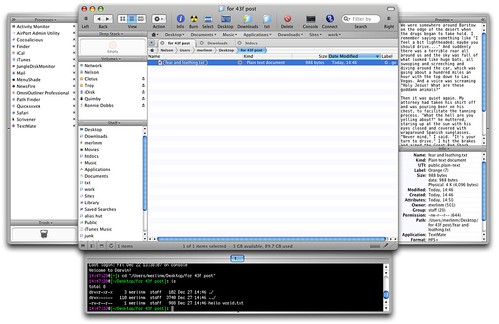
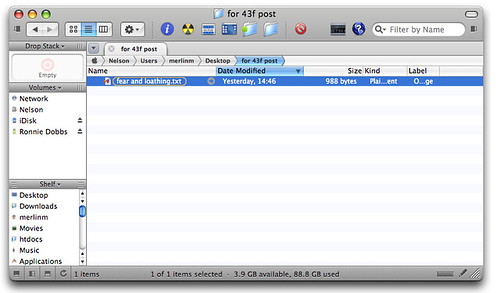
Given the comments and emails I receive whenever I use Path Finder in a demo, it’s clear to me that people are hungry for ways to improve and customize their stock Finder. PF’s appearance in my latest MacBreak has been no exception. So, for folks that haven’t heard my pimping before or who haven’t been following the recent additions to the inarguably crufty uber-app, here’s a tricked-out Path Finder window, showing the new tab functionality, plus all the optional drawers, tchotchkes, and finials that can be displayed. For more on why I dig Path Finder, read 7 things I like about Path Finder for OS X. And be sure to check back soon on MacBreak (HD 1080 Podcast feed); Leo and I have a segment on Path Finder that should be airing soon. Addition 2006-12-28 10:31:43 Neil makes a great point in comments. I have this terrible habit of only ever showing Path Finder with all of its features on, and all its optional frippery enabled. In fact, PF needn’t look like a functional salad bar at all, and the enclosed is closer to how I configure it for my own everyday usage. Thanks, Neil. 20 Comments
POSTED IN:
![]() Steve, I currently use it...Submitted by Dave M. (not verified) on January 2, 2007 - 4:56am.
Steve, I currently use it “with” the Finder. DragThing will use PF instead of Finder when opening disks and other folder links, when configured to do so. I personally still dump files on the desktop, but the Drop Stack is a great way of moving files from one location to another. It’s like an iClip for files. It’s jam packed full of useful things that I almost can’t live without. PathFinder doesn’t really help you organize your files any easier than the Finder does. You still need to do that on your own. PF just makes it easier to deal with the file structure you come up with. »
![]() [...] A band-aid for the Finder...Submitted by A band-aid for the Finder « Isn’t that special (not verified) on December 29, 2006 - 11:29am.
[…] A band-aid for the Finder Yes, the Finder could be better. I think many of us are hoping that the next OS release brings tabbed finder views and a simple way to deal with moving and viewing files. But until that day comes, there is Pathfinder by Cocoatech (PF4). It’s been touted on 43Folders a couple of times, here and here. Cocoatech have produced a quality product that feels right at home on my desktop. It takes some practice to get used to it though, so I’ll outline some cool features here. […] »
![]() My big question for PF...Submitted by steve mcfarland (not verified) on December 29, 2006 - 12:33pm.
My big question for PF users: you guys are running this instead of the Finder and launching at login? And what is the advantage for me in hiding my desktop? Where are you dumping new files? I’m desperately in need of a logical document & file management structure and something in me feels like this could be the solution. »
![]() Hi MM~ Thanks for...Submitted by StuckInQwerty (not verified) on December 28, 2006 - 10:24am.
Hi MM~ Thanks for making my world a more GTD place! The thing that intrigues me about the programs you pimp is their hybridization at the meta level. That is, how does kGTD (c’mon OmniFocus!), DevonThink, QS, PathFinder, iCal, etc. fit into your system at the level of integration? Have you sorted out QS to DThink? (Please please please share soon!) How do you sync your “(D)Think’? Oh, and what browser do you use? While i love the idea of using ‘services’ from safari (or camino) to say DThink or VoodooPad, the add-ons to FireFox have kept me there (and cocoa is coming for FF3!) How do you surf? »
![]() Eloy, command click on the...Submitted by Anneliese (not verified) on December 28, 2006 - 10:49am.
Eloy, command click on the folder name at the top of the Finder window, and that will give you the path length. »
![]() Kudos for the "Fear and...Submitted by Eric (not verified) on December 28, 2006 - 12:30pm.
Kudos for the “Fear and Loathing in Las Vegas” reference. As a journalist aspiring to reach Gonzo some day it’s nice to know you’re reading good material. »
![]() It does have a large...Submitted by TommyW (not verified) on December 29, 2006 - 6:09am.
It does have a large footprint and it needs a good CPU. To be honest it really only came into its own with my new MBPro. That said, I used it, in preference to not using it, on my old G4 667Mhz Powerbook, but there were times I opened a new Finder window while PF sent that beachball spinning… I bought it about 1/3 of the way into the trial period, being a pretty skeptical commentator on Merlins initial post way back. I thought it was overpriced, but it’s not, it’s great. I love the Preview pane for word and text docs, I love the Drop Stack, I love the myriad options the contextual menu gives me which Finder doesn’t, I love the Size Browser which duplicates the functionality of OmniDiskSweeper, I love the Terminal drop down pane, I love the multiple shelves, the new inclusion of Tab sets which permits you to set up workspaces (please combine with window setups and I’m a happy bunny…) »
![]() I recently switched my work...Submitted by Eloy Ramirez (not verified) on December 28, 2006 - 6:35am.
I recently switched my work and process over to my macbook pro. One of the things that drives me crazy is that I cannot find a way for Finder to display the folderpath (not just the current foldername). I am a Photographer and copying files to 3 locations gets confusing. Path Finder does the job much better…but I wish Finder did it inherently. »
![]() Pathfinder is great - although...Submitted by Peter Morgan (not verified) on December 28, 2006 - 6:14am.
Pathfinder is great - although it takes a while to configure and simply get used to the myriad of options available to you. I would recommend anyone to try it free for thirty days first as it can be a little overwhelming. Set it up carefully and it’s a huge improvement over the standard finder. »
![]() I want to like PathFinder,...Submitted by Jeff Shell (not verified) on December 28, 2006 - 6:35am.
I want to like PathFinder, but it’s just way too busy. I see that screen shot with all of the drawers and tabs and splits and what-not and my head explodes. I haven’t tried PathFinder 4.x, but a major annoyance (for me) about earlier versions was that the context / action menu wasn’t intelligent. It didn’t filter things out like the Action menu in the Finder does. As such, I was presented with many more actions than I could actually perform on a particular item or set of items. Maybe this has been fixed, I don’t know. But between the minor annoyance of having two file manager applications running simultaneously and the over-glut of features in PathFinder, I could never latch on. It was just too distracting. I find it interesting that you’re such a big fan of PathFinder, given how much this site seems to emphasize removing/hiding unnecessary distractions. My experience with PathFinder was more frustrating and distracting than it was helpful. But you may live and work in the file system more than I do. Personally I find that QuickSilver + Finder, especially when using Triggers, has been a powerful combination. Beyond that, I tend to prefer more specialized file management to come from more dedicated applications: GraphicConverter’s folder browser for working with images; assorted audio utilities for digging through large folders of samples and audio snippets; TextMate’s open-folder-as-project mode for working with big hierarchies of source code; GoLive’s site manager for managing personal web sites; etc… I think that PathFinder is decent software, but it just hasn’t worked for me. »
About Merlin MannBio Merlin Mann is an independent writer, speaker, and broadcaster. He’s best known for being the guy who started the website you’re reading right now. He lives in San Francisco, does lots of public speaking, and helps make cool things like You Look Nice Today. Also? He looks like this, answers questions, and has something like a life. Merlin’s favorite thing he’s written recently is a short essay called, “Better.” |
|
| EXPLORE 43Folders | THE GOOD STUFF |