Merlin’s weekly podcast with Dan Benjamin. We talk about creativity, independence, and making things you love.
DEVONthink: An appreciation of "smart groups"
Merlin Mann | May 22 2006
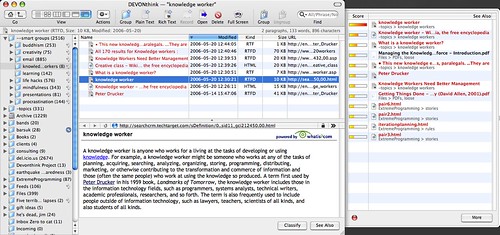
I've recently gotten way back into DEVONthink as a means to capture, wrangle, and analyze all the reference material in my world. If you're new to this amazing application -- and at the risk of far exceeding my understanding of both the human brain and this particular piece of software -- DEVONthink learns the neural pathways between the stuff you know or say is related. But, more importantly, it prompts you on the relationships you probably don't know exist (yet). This is awfully useful and wildly stimulating to the busy front parts of my own brain, such as it is. I'd seen the power of the app before and have been way inspired by how the heroic Steven Johnson is using it, but the learning and experience curves always seemed just a bit steep for me, given the returns that it yielded in my too-brief usage. Still, I was quite smitten with the concept. Flash forward a year and a half. I've now had DT Pro v. 1.1.1 in battlefield action for the last few weeks, and have been dutifully feeding it anything I find that seems tangentially interesting or useful; a few custom Quicksilver triggers mean one-click, no-look addition of any data type, from web pages to text selections to photos, full PDFs, and movie files. Thus far, this includes stuff like:
My focus over this time has been strictly on capture, rather than trying to make anything particularly useful of it all just yet. But I've recently started grouping and classifying occasional clusters of content using the app's killer feature: really smart AI that finds associations between items based on a concordance of common words and similar previous relationships you've established. So, I have the start of a potential post underway that will re-introduce DT in more detail (which I've been building right in DT, natch), but I was moved today to share the insane usefulness of DEVONthink's "Smart Groups."
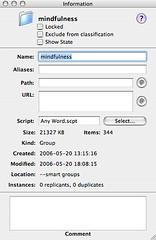
So, in the example illustrated at the top, my "knowledgeworkers" group creates a folder full of "replicants" (think: OS X aliases, not Roy Batty) for any docs that contain the string "knowledgeworkers." The smashed-together names, as you might gather, shows you how you can fake tagging by adding keywords to the comments field of any documents; scripts in this thread make it super-easy to "tag" multiple documents at once. The beauty part is you don't have to use these ersatz tags at all; if your needs are modest and you just want to find all the items that contain both "learning" and "amygdala," for example, it's a breeze. The smartypants concordance eats stuff like that for lunch and excretes constantly updated results right into your designated Smart Groups buckets. Nice and easy. Like I say, I'll probably have more to say on DEVONthink soon, but if you find yourself dealing with very large amounts of information that need to be stored, synthesized, and re-combined, there's a lot to love in DEVONthink. It's had a subtle effect on the ways that I collect information, but I have a feeling its impact on what I do with it might be pretty profound. 6 Comments
POSTED IN:
Thanks, but......
You will bookmark the... by Pajamas Media (not verified)
[...] DevonTHINK is great for... by Jack Baty Says… » Blog Archive » Merlin on (not verified)
[...] It pays to read... by The Creativity Factory » Blog Archive » Superb M (not verified)
[...] Over at 43 Folders,... by a million monkeys typing » 43 Folders on DEVONthink an (not verified)
[...] DEVONthink: An appreciation of... by Meandering Passage » Blog Archive » DEVONthink S (not verified)
About Merlin Bio Merlin Mann is an independent writer, speaker, and broadcaster. He’s best known for being the guy who created the website you’re reading right now. He lives in San Francisco, does lots of public speaking, and helps make cool things like You Look Nice Today, Back to Work, and Kung Fu Grippe. Also? He’s writing this book, he lives with this face, he suffers from this hair, he answers these questions, and he’s had this life. So far. Merlin’s favorite thing he’s written in the past few years is an essay entitled, “Cranking.”
|
|


| EXPLORE 43Folders | THE GOOD STUFF |


