Merlin’s weekly podcast with Dan Benjamin. We talk about creativity, independence, and making things you love.
Our Most Popular PostsGrids, The Rule of Thirds, and Rethinking Slide PresentationsMerlin Mann | Dec 31 2007I received my contributor copy of Garr Reynolds's Presentation Zen book last week and proceeded to devour it over the weekend. A fuller review is coming to this space soon, because this is the book about presentations that's needed to be written for years, and it's just fantastic. Best of all it's not another recipe book about "how to make slides" -- this is about re-imagining how your entire presentation will work together as a persuasive and integrated show, from conception through delivery. Awesome. Anyhow, with my inaugural Macworld talk looming on the horizon (T-minus 16 days, thanks), I've been inspired by Garr's book (and the top-notch site on which it's based) to, among other things, try revamping the approach to how slides fit in to my overall show. As I said on the Twitter, that starts with shit-canning the PowerPoint-y Keynote templates I've previously torn up and pasted together for stuff like Inbox Zero (here's the slides for that one, which Garr was kind enough to feature in his book). But, now, rather than strictly trying to reinvent the wheel, I have a quest. A quest for a crazy-simple, design-centric Keynote template that's more about composition than gradients and 3-D bullet points. Ever heard of The Rule of Thirds? read more »20 Comments
POSTED IN:
Vox Pop: Workflow for the Fujitsu ScanSnap?Merlin Mann | Oct 23 2007In comments about yesterday's "Making friends with paper" post, I was reminded by 43f member Adam Hooks...
Adam remembers correctly that I purchased and preliminarily fiddled with the Fujitsu ScanSnap S500M for OS X (Info, Amazon). It's a small-footprint, high-speed document scanner that a lot of people have been talking about lately. I'd read so many reviews and blog posts about how easy it is to use that I was intoxicated by the dream of a life -- if not without paper storage -- where I could at least try to minimize my unnecessary paper clutter and start making document archiving easier and more searchable. Given the not inconsiderable cost of the unit, I'm embarrassed to say that I got busy with other stuff and haven't yet returned to using the ScanSnap in any automated way. Doesn't mean I'm not interested or haven't gotten started... read more »POSTED IN:
Merlin at IDEO: "Know How" Talk with Scott UnderwoodMerlin Mann | Oct 9 2007Scott Underwood from IDEO was kind enough to invite me down to their Palo Alto HQ for a tour of the renowned design group (they designed Apple’s first mouse!) and to participate with him in one of the company's internal "Know How" talks. It was very informal (and -- because this was during my recent "100-year sinus infection" -- I was completely high on cold medicine). read more »POSTED IN:
The Art of Packing LightMerlin Mann | Jun 12 2006Carrying off the art of one carry-on Yesterday, The Chronicle ran a couple great articles on how to pack light for a trip. From "Carrying off the art of one carry-on:" read more »POSTED IN:
Open Thread: What's your killer app?Merlin Mann | Aug 21 2006The other day I was talking with someone about the novel and non-obvious ways that people use Excel in their work and home life. Gotta say, I've personally seen some pretty amazing stuff happen when people take a favorite app, get really good at it, then bend it to their will. (And Excel is perfect for this.) This tracks to Danny's Life Hack concept by which the alpha geeks were achieving lofty heights of productivity partly by mastering 1-3 "killer apps" -- then using them to solve most of their information and functional problems in fairly novel ways. So my question for you: What's your killer app? Is there one place where 80% or more of your activity takes place (by choice)? Vim? Excel? Perl? Firefox? Post-it Notes? What's yours and when did you realize you'd become a badass at using it? POSTED IN:
GMail + GTD = GTDGmailMerlin Mann | Aug 21 2006GTDGmail - The Firefox Extension that Combines Gmail with Getting Things Done - home GTDGmail looks like a promising entry into the increasingly crowded gene pool of web-based productivity software. The Firefox extension runs on top of your Gmail account, giving you an email-centric approach to implementing Getting Things Done that includes contexts, statuses, a very nifty search feature, and more. This could be just the thing for people who have to live in email, but who don't want to live in an unprocessed inbox. From the GTDGmail site:
GTDGmail requires Firefox -- as in vanilla Firefox; it didn't work on my (preferred) Mozilla browser, Flock, but I'm open to accounts of pilot error if I'm missing anything. Edit (2006-08-21 07:32:57): Well, that was mean and Michael Arrington of me, wasn’t it? :) I was incorrect in thinking GTDGmailhad gone functionally public (although the project seems pretty well known already). Keep an eye out for the full release (and do forgive me for the unintentional tease). Edit (2006-08-21 18:01:06): Yay! Looks like it's available now: GTDGmail :: Mozilla Add-ons :: Add Features to Mozilla Software. Thanks, Aaron. POSTED IN:
David Seah on wall-based productivity pr0nMerlin Mann | Nov 28 2006David Seah explores a treasure trove of lo-fi productivity pr0n, as provided by the vertical-surface-loving folks at Magnatag: read more »POSTED IN:
Podcasts of non-commercial and public radio showsMerlin Mann | Apr 30 2005Got a good link that collects free podcasts from non-commercial radio shows? Have a favorite or obscure program to recommend in podcast format? read more »POSTED IN:
Guide to Better NappingMerlin Mann | Jun 17 2008
I'm a big fan of napping and often evangelize the transformative power of a quick Pzizz. If you're new to the nap habit -- or if you buy the propaganda that naps are only for infants and layabouts -- treat yourself to this cool infographic from The Boston Globe (shown in part above). [via Arts & Letters Daily] read more »POSTED IN:
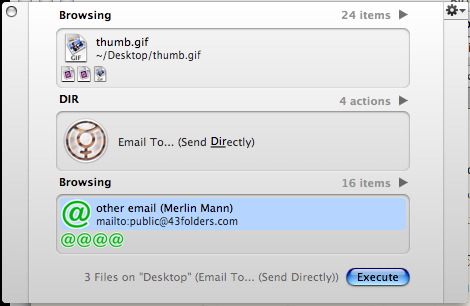
Quicksilver: The Comma TrickMerlin Mann | Jun 13 2005
Now consider a few possibilities of “The Comma Trick” read more »POSTED IN:
|
|



| EXPLORE 43Folders | THE GOOD STUFF |


