Merlin’s weekly podcast with Dan Benjamin. We talk about creativity, independence, and making things you love.
June, 2007Merlin on MacBreak Weekly: iPhone Release ShowMerlin Mann | Jun 30 2007
> Hosts: Leo Laporte, Merlin Mann, Scott Bourne, and Alex Lindsay > > iPhones in hand our MacBreak quartet gives you their first impressions of the latest from Apple... Here's a direct MP3 download of MBW 46. Believe it or not, this week's episode was about Apple's iPhone. Yes, the iPhone. I know: I was surprised, too. Also, we shot a quick MacBreak (video) on Thursday night where we visited with people queued up outside the Stockton St. store here in SF. I chatted with a bohemian clown, an expensive-looking video camera, and a man from Gizmodo who had a webcam attached to his head. Just another Thursday in Union Square. Anyhow, the iPhone is out, it's pretty, and lots of people are buying them. For further coverage of the iPhone and the experiences of its excited new users, kindly visit the entire internet. POSTED IN:
Business 2.0 interview with GTD's David AllenMerlin Mann | Jun 28 2007David Allen: The master of getting thing done - July 1, 2007 Terrific article on David Allen and his company. Although the perspective is heavy on the business and money (well: after all, it is Business 2.0), there's lots of interesting history and insight in here as well.
I hung with David when we were doing our podcast together (download the mp3), and I'll tell you what: that is exactly how the man works, and it's inspiring to watch. POSTED IN:
Michael Buffington: iGTD + Quicksilver + subversionMerlin Mann | Jun 28 2007This is the second entry in a multipart series about my recent obsessive love affair with GTD, the iGTD application and Quicksilver. In the last entry I put the emphasis on getting my tasks written down quickly and out of my focus into a system I could trust. I could choose to spend some time later to review my tasks and do what I like to call "iGTD gardening", where I check up on all my projects and do a bit of weeding of duplicate or irrelevant tasks, and fortify those tasks with whatever information comes to mind as I'm looking at them. Since I'm now in the habit of pushing new tasks to iGTD and immediately forgetting about them I have the refreshing ability to work on a task without ever thinking about anything else. iGTD then becomes my set of instructions to follow when I need guidance, and if I've tended my task garden well, it's a rich set of instructions with a lot of tedious thinking already finished. This system works out alarmingly well until you're possessed by SSD (severe stupidity disorder) and delete your iGTD database without even a whiff of lingering vapors. Immediately you'll be consumed by a profound and unshakable dread as you realize your tether has been severed from the mother ship and you begin to drift into outer space, your Tang to be divided up amongst your colleagues (even the ones you loathe). Luckily for most of us, iGTD makes database backups upon starting up the iGTD app and for a couple of other events, and luckier still, most of us don't suffer from SSD very often. But I often do, and don't leave anything to chance. read more »13 Comments
POSTED IN:
Vox Pop: Have you tried outsourcing your life?Merlin Mann | Jun 25 2007A lot of my friends have been reading The 4-Hour Workweek by Tim Ferriss, and, to varying degrees, several of them have started trying on some of his more audacious ideas, such as checking email once a week, finding an "income muse," going on an extreme information diet -- a few people I know are considering outsourcing pieces of their personal and professional lives. For reasons I can't fully explain -- and will, for now, just write down to Tim's engaging style -- I also found this outsourcing idea weirdly fascinating. You identify the tedious tasks in your life that don't represent the best use of your time, and assign them to an overseas worker who can complete them for a few bucks an hour. This apparently can be virtually any kind of mundane task, from booking a dinner reservation to doing research on a company to -- heck, why not? -- answering your email. So, while I know lots of people share my theoretical interest in this, I wonder how many of you have tried it, and how many of you are using outsourced help on a regular basis. What's your experience been? Does this work? What sorts of task are most amenable to long-distance assignment? read more »POSTED IN:
Unclutterer talks with "Clean Sweep" host, Peter WalshMerlin Mann | Jun 22 2007Peter Walsh answers questions for Unclutterer.com Thanks to my self-imposed media tunnel vision (and the bulging TiVo that enables it), I've apparently managed to miss a show on TLC called Clean Sweep that sounds like it's potentially up my alley. I guess the idea is that they parachute in to crazy-messy houses and help the harried occupants affect a makeover. The wonderful Unclutterer.com recently interviewed the show's host, Peter Walsh, and he had a couple interesting things to say about origins of clutter that get to the root cause:
Here's Walsh's new book: It's All Too Much: An Easy Plan for Living a Richer Life with Less Stuff. Already ordered our household a copy. read more »POSTED IN:
Organic, grass-fed remainders, 2007-06-21Merlin Mann | Jun 21 2007Herewith: news bits, remainders, and low-threshold links for your dining and dancing pleasure.
POSTED IN:
MacBreak Weekly 45; iPhone release night; Quicksilver mouse triggersMerlin Mann | Jun 20 2007
> Hosts: Leo Laporte, Merlin Mann, Scott Bourne, and Alex Lindsay > iPhone gets a better battery and screen, MacGPS rumors, and Safari holes... Here's a direct MP3 download of MBW 45. Gotta tell you: I'm really excited about the imminent arrival of the iPhone for an unconventional reason: the possibility that we can eventualy stop talking about the iPhone. (sigh) Anyway. Two things related to this episode:
POSTED IN:
43f Feature: Michael Buffington's "How I use iGTD"Merlin Mann | Jun 19 2007Michael Buffington is a pal of mine who's a talented developer and all-around swell fellow. I got to work with him a bit on the Stikkit project and, in some of our offline talks on productivity stuff, I was intrigued to learn about some of his ninja geek skillz. I asked Michael to write up a series on some of his favorite tricks to get his stuff done, and he kindly obliged. Here's part one. --Merlin How I use iGTDThis is the first part in a multipart series about using iGTD with Quicksilver and how it's changed my life, allowed me to grow hair where I never thought it possible, and more importantly, spend more quality time with my children (who are, as you might know, super humans with indescribable special abilities). I'm a recent and somewhat enthusiastic convert to GTD. I have had the good fortune of starting to manage my digital life with GTD the same day Merlin first mentioned a great application for OS X called iGTD. I have to admit though that I'm not a very hard core GTD follower yet. The most important parts of GTD for me are getting my tasks out of my head the moment they pop into existence, and putting them into some sort of system I can trust. iGTD allows me to do exactly that in a very intuitive way, but if I'm having a good day I only ever bring iGTD into focus when I'm not sure what's next on my list. read more »POSTED IN:
Link gratitude: Where I find my best stuffMerlin Mann | Jun 18 2007I always try to credit the source for stuff that I link to when I've learned about it from other sites. In addition to helping my readers connect with voices they may not have heard before, I believe it's just the classy thing to do. (I'm looking at you, "A Listers" -- a lot of you have started dropping vias for everyone but your highest-profile buddies: tacky, tacky). Anyway, I admit that I'm not 100% either, but in the interest of trying to make good, here are a few of the sites that I find myself reading and linking to a lot. Thanks to their authors and contributors for sending me (and you) to so many interesting places. read more »POSTED IN:
Jason DeFillippo's 90-day program: "Just Start"Merlin Mann | Jun 18 2007My pal, Jason DeFillippo, has recently begun a project to clean up his act over the next ninety days. In preparation for hitting the big three-six, he's planning to tidy up, lose some weight, and start shedding the nonsense, clutter, and distractions in his life. Go, man, go. Personally, I've had mixed to terrible results with things where I tried to invert too many habits at one time, but Jason is nothing if not a hardass and a man of firm resolve. I'm looking forward to watching his progress over the summer and learning what I can from him. I'll tell you one thing we agree on; it's all about getting started:
Good on 'ya, Jason. Rock it. Here are Jason's "90 Days" posts so far: read more »POSTED IN:
Merlin on TWiT 101: Moon over GoogleMerlin Mann | Jun 18 2007
POSTED IN:
Stefan Sagmeister on design and happinessMerlin Mann | Jun 14 2007TED | Talks | Stefan Sagmeister: Yes, design can make you happy (video) I really enjoyed this 15-minute TED presentation by Stefan Sagmeister (watch out: flashy page with grabby browser javascript) on how specific instances of design have made him happy. The replacement subway signs he mentions (recreation below via Chris Glass) really are pretty terrific. (Anyone have more info or links on the artist and the guerilla campaign?)
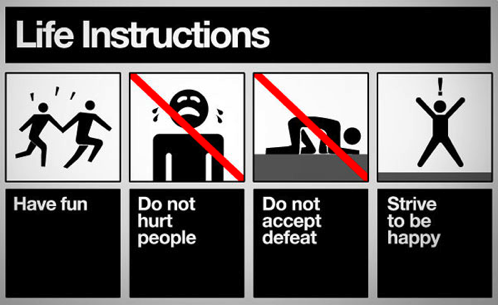
Like, Chris, I also really like what Sagmeister has to share about the patterns in his own life that have made him more happy than not. It's easy to see how striving to live these sixteen bullets could help a person enjoy a more creative, open world. read more »POSTED IN:
MacBreak Weekly: WWDC Special EditionMerlin Mann | Jun 11 2007MacBreak Weekly 44: WWDC Deconstructed
> Hosts: Leo Laporte, Merlin Mann, Scott Bourne, Andy Ihnatko, and John Gruber > We run down the WWDC announcements, and John Gruber explains why Safari for Windows makes sense... Here's a direct MP3 download of MBW 44. Comments are open for your own thoughts on the WWDC keynote. POSTED IN:
OmniFocus in SF, WWDCMerlin Mann | Jun 6 2007The Omni Mouth » OmniFocus demo at the San Francisco Apple Store
My peeps at OmniGroup mentioned this, so I'll slide it in as well. I'll be appearing with my OmniBrethren at the Stockton Street Apple store on Thursday June 21st to demo OmniFocus. Huzzah:
Be there. Second, I heartily second Linda's suggestion that you email (omnifocus-wwdc at omnigroup dot com) if you're interested in doing an informal OF meet-up at WWDC. If you don't come, Ken and I will have to sit there and stare at each other and maybe talk about D&D. Please, don't make us talk about D&D. Update 2007-06-11 09:32:34 - OmniFocus at WWDC is scheduled. According to a recent Message of the Day in the OmniFocus beta:
This should be a lot of fun. If we can wangle A/V equipment. we'll do a demo of the latest version or OF, plus we'll be available to answer any questions about OmniFocus and just generally hang out. Nota bene: I believe that this is for WWDC pass holders only. So I apologize in advance if there's an iPortcullis in place, and really encourage you to come to the event at the Apple Store next week if you're around. Update 2007-06-12 23:24:49: Note room change above. We're now in the larger "Olympic Room." POSTED IN:
Pmarca productivity: Excellent tips for getting through the dayMerlin Mann | Jun 5 2007blog.pmarca.com: The Pmarca Guide to Personal Productivity What a fantastic post. And so many great suggestions that I'm hesitant to choose a sample...so I'll limit myself to three:
Most of the tips on this page strike me as being very practical, real-world, battlefield advice that works. And even if you can't totally avoid a schedule or totally keep email checking down to twice a day, it won't hurt to soak up the spirit of these ideas and let them move by osmosis into the places where they can do you some good. Shake it up a little. Highly recommended for anyone who likes 43-folders-esque stuff. (And triple credit for the Robert Evans reference. Did it make me happy? You bet your ass it did.) POSTED IN:
The Merlin Show: John Roderick, Jesse Thorn, true HD, plus a cool new Flash playerMerlin Mann | Jun 5 2007Over on my video podcast, The Merlin Show, we recently wrapped up our epic 4-part interview with John Roderick from The Long Winters (n.b.: part 3 is my favorite episode of the show so far). And, just yesterday, we posted the first in a six (6) part visit with America's Radio Sweetheart, Jesse Thorn, who's the host of the nationally syndicated public radio program (and, arguably, the best podcast [iTunes] in America), The Sound of Young America. (And now I can't stop saying "webmobisode" -- damn you, Jesse Thorn). I hope you'll stop by if you haven't visited with us in a while. Plus -- thanks to the generous nerd skillz of our friends over at Blip.tv -- you can now watch each and every episode of The Merlin Show from the comfort of this handy dandy Flash viewer. (Note that you can jump to any episode by clicking on " And, finally, please consider subscribing to The Merlin Show in iTunes or via the podcatcher of your choice. As of our latest episode, the Apple TV version of the feed goes out at full-on HD 720p (thanks, HV-20s!).
POSTED IN:
Getting ready for OmniFocusMerlin Mann | Jun 4 2007(Disclosure: I am a contributor to the OmniFocus project) According to OmniGroup, about 2,500 people are now participating in the "sneaky peak" beta of OmniFocus, and new folks will continue to be added as capacity for support allows. But even if you're not yet using the app and are just waiting to get your hands on a finished version, it's not too early to start thinking about making a smooth transition from wherever you are now. Moving your world of action into a new application is like moving into a new house (and can be almost as stressful). This is your chance to throw away crap, rethink how you've been doing things, and just give yourself a fresh start. So before you ever fire up OmniFocus for that first time, do yourself a favor and get sorted out with your current system first. Believe me, you're much more likely to handle this well before the temptation of having the app in your hands sends you diving into using it full-time. In short, I recommend you start by conducting a thorough review that's focused on bringing all your tasks and projects up to date and in line with reality. read more »POSTED IN:
New iPhone ad: Release on June 29thMerlin Mann | Jun 3 2007iPhone will be released on June 29th. Here's the ad from tonight's 60 Minutes. (added a better version of the video, via Gizmodo [Original news via: iPhone: yours on June 29th - Engadget] Added 2007-06-03 16:48:46: Commenting on the Engadget story, Jake points to three new iPhone commercials on Apple's site. Check out "Never Been an iPod." Lovely. read more »POSTED IN:
Hand-picked, artisanal, remaindered links, 2007-06-04Merlin Mann | Jun 3 2007These are lower threshold links to stuff I've recently enjoyed.
Submit your ideas for links to del.icio.us, and be sure to include the tag "for:43folders." POSTED IN:
Media Coverage & Review RequestsMerlin Mann | Jun 2 2007Media InquiriesIf you have questions about 43 Folders or would like to interview us for print or broadcast, please contact Merlin. Previous Media CoverageAs you know, the web is a volatile place, so some of these links may perish over time. Apologies in advance for any pages that disappear or convert to “subscription only.”) read more »POSTED IN:
Suggest a SiteMerlin Mann | Jun 2 2007< div class="tip"> IMPORTANTThere’s only one way I’ll ever see your link, and it is not via email. Please read on… read more »POSTED IN:
43 Folders' ForumMerlin Mann | Jun 2 2007The latest addition to the 43 Folders family is our new messageboard forum. We're still getting our sea legs with the new format, but so far it's been a lot of fun. Stop by and look around--if you register, you'll see one less ad, but, more importantly, you can post new threads and even get to pick your own title. Not too shabby. POSTED IN:
43 Folders' WikiMerlin Mann | Jun 2 2007The 43 Folders Wiki is a resource for collaborating more deeply on some of the stuff we talk about on The Mothership. Any page is editable by any registered user, so it's super-simple to create fast, up-to-date pages on productivity, time management, software, and life hacks. read more »POSTED IN:
|
|





| EXPLORE 43Folders | THE GOOD STUFF |


